
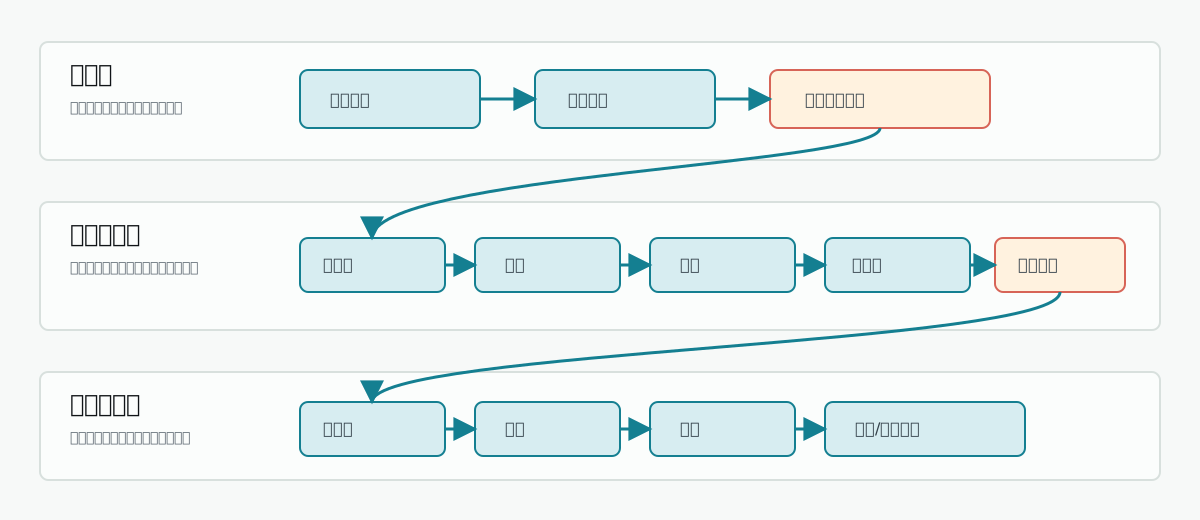
End-to-end three-layer production chain
Three-Layer Division of Labor
Why Three Layers
The boundaries between layers are not arbitrary. Each layer only does what it should do, without overstepping, to ensure long-form creation controllability.
If a piece of information needs to long-term influence subsequent chapters, it must cross the boundary and land in an asset or task record. Content that only exists in conversation context cannot guarantee stable reading by subsequent Auto Director and chapter execution.
Idea Layer: From Fuzzy Idea to Selectable Direction
The Idea Layer solves “what exactly is this book about.” It does not directly write chapters, but organizes user ideas into multiple selectable directions, avoiding the beginner’s burden of manually writing worldviews, characters, and outlines from the start.1
Idea Alignment
The system understands the input idea, genre, reader feeling, and default parameters, and organizes them into candidate generation input.
2
Project Positioning
The system forms a book-level positioning, selling point, and target reader judgment.
3
Direction Candidate Batch
A batch of selectable book-starting directions appears on the page. Each direction includes genre, core selling point, protagonist starting point, and progression mode.
4
Title Candidate Group
After selecting a direction, a title group and recommended titles appear. If unsatisfied, you can redo only the title group.
Auto Director Layer: From Direction to Executable Assets
After confirming the direction, the Auto Director Layer turns “what I want to write” into “materials that every subsequent chapter can read.” This layer contains the complete planning chain from creating the novel to splitting into chapter briefs.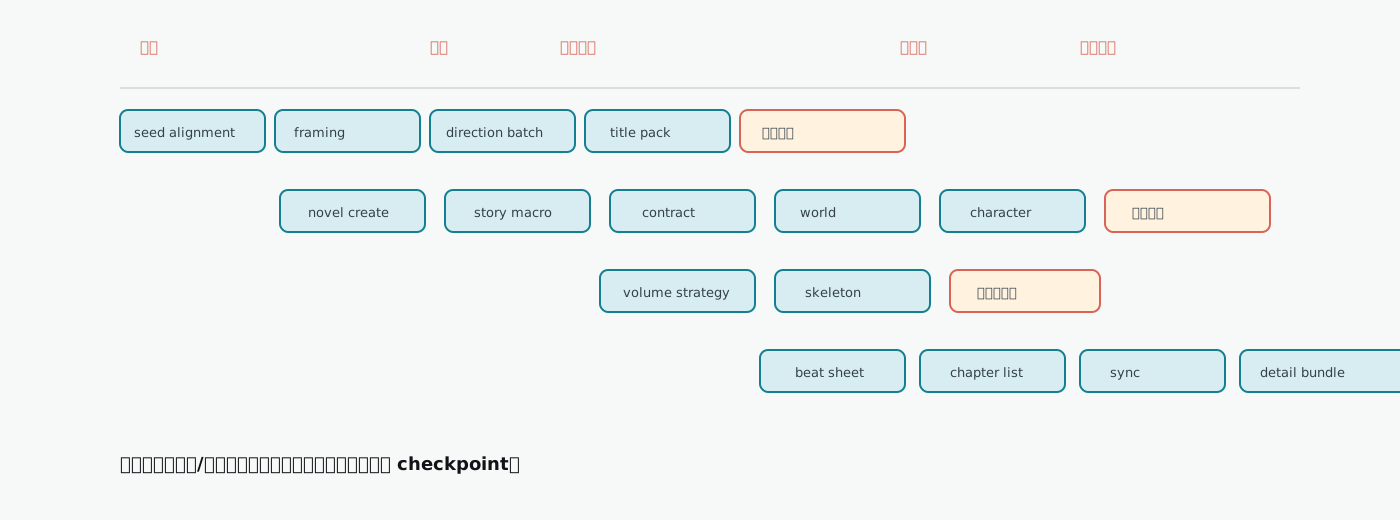
Auto Director phase Gantt chart
Asset Preparation Phase
The character phase is an important quality gate. If character names still feel like functional slots such as “mentor-type heroine” or “villain boss,” or lack identity anchors, the system will stop at Waiting for Character Confirmation (等待角色确认) rather than bringing a low-quality cast into volume planning.
Volume Planning Phase
The volume planning phase solves “how to advance the whole book by volumes.” It does not directly write chapter body text, but first determines each volume’s reader promise, main conflict, stage goal, and structural load.
If volume strategy is wrong, handle it in the volume planning entry first. Do not only change chapter titles. Chapter titles are downstream results and cannot correct upstream volume mission.
Chapter Detailing Phase
The chapter detailing phase splits volume planning into executable chapter tasks. It is the handoff layer between Auto Director and body-text execution.Chapter Execution Layer: From Brief to Body Text and State Backfill
The chapter execution layer is responsible for turning prepared chapter tasks into body text, and feeding the new states produced by body text back into subsequent chapters. It is not as simple as “write one chapter,” but a closed loop composed of body-text generation, audit, repair, quality debt, and state sync.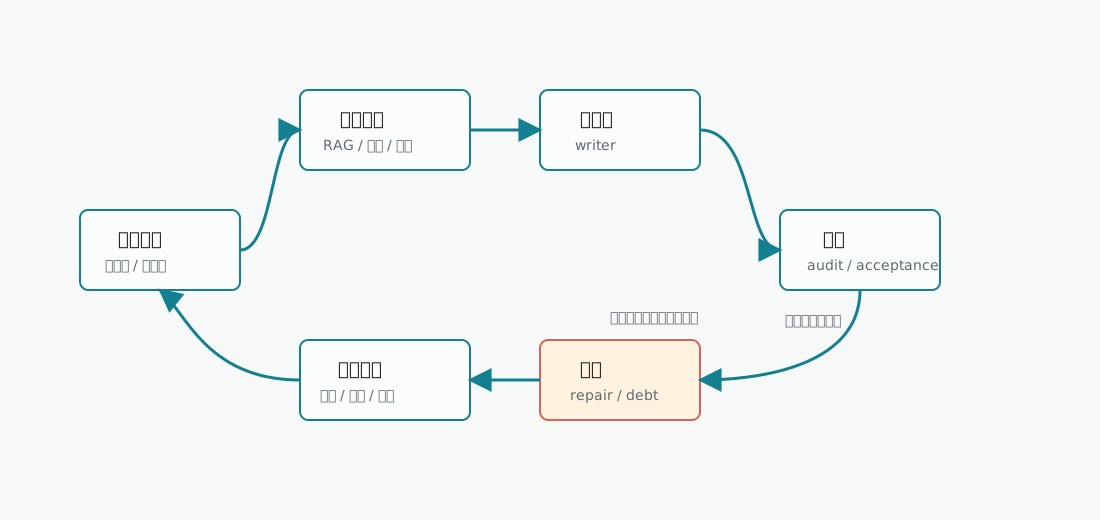
Chapter execution loop
1
Context Assembly
Aggregate book contract, character states, world rules, fact ledger, foreshadowing ledger, style assets, and RAG recall materials into a context package.
2
Body Text Generation
Generate body-text draft based on the context package and chapter brief.
3
Audit
Judge whether body text satisfies chapter tasks, continuity, character behavior, pacing, and style requirements.
4
Repair
Low-risk issues are auto-repaired; structural issues enter checkpoint waiting for confirmation.
5
State Backfill
Save body text, sync character states, fact ledger, foreshadowing ledger, and world changes.
Production Mode: How Far Auto-Runs After Confirming the Plan
When starting Auto Director, you must select a run mode. The mode determines how far the system will auto-advance after confirming the plan.
If unsure, beginners should prioritize Prepare to ready first. If the goal is to get chapter body text directly from confirmed plan, choose Full-book auto-completion, and keep the model, quota, and network stable.
Shortest Unattended Path
From the user’s perspective, the shortest unattended path is:1
Enter starting idea
When there is no idea, select an idea card provided by the system.
2
Select run mode
Keep default parameters, choose Full-book auto-completion or Prepare to ready first.
3
Generate first batch of plans
Click Generate First Batch of Plans (生成第一批方案).
4
Confirm book-level plan
On the Confirm Book-Level Plan (确认书级方案) page, select a plan; if unsatisfied with the title, you can redo only the title group.
5
System auto-advances
After confirmation, the system creates the novel and enters the AI Cockpit, automatically running through planning, characters, volume strategy, beat splitting, chapter execution, quality repair, and state backfill.
Key Observation Points
From empty project to chapter batch completion, these are the nodes most worth observing:
These observation points are more important than “progress bar percentage.” The key in a long chain is not reaching 100%, but whether each handoff point truly saved a usable artifact.
State Persistence and Recovery
Auto Director does not just run a string of calls in memory. Key states are saved to the database and task records, supporting recovery after page refresh, service restart, or worker interruption.Frontend state is not the final truth. If the page display and Task Center are inconsistent, prioritize the backend task status in Task Center and Director Follow-up. Page refresh, lost route parameters, or notification delays do not mean the backend task has stopped.
Asset Closed Loop: Why Long-Form Can Keep Writing
The end-to-end production chain’s goal is not generating one chapter at a time, but letting each chapter’s results continue to serve subsequent production.
The asset closed loop is also the foundation for RAG and style assets. The knowledge base provides external materials; chapter execution produces this book’s internal facts. Both enter the next chapter’s context together.
FAQ
Why do layers need clear checkpoints?
Why do layers need clear checkpoints?
Checkpoints are boundaries where the system “can pause for user confirmation,” not failures. They let the user decide to continue, adjust, retry, or replan before direction, characters, volume planning, chapter batch, or quality repair. Without checkpoints, the system might bring low-quality artifacts downstream without the user’s knowledge.
Why does it still stop after choosing full-book auto-completion?
Why does it still stop after choosing full-book auto-completion?
Full-book auto-completion will proactively stop and wait for user handling when encountering model unavailability, quota exhaustion, quality audit requesting replanning, repair chain consecutive failures, or detected structural data problems, rather than retrying infinitely. After interruption, status is saved to Director Follow-up, and can be resumed from the original checkpoint after the issue is resolved.
Will modifying upstream artifacts affect downstream?
Will modifying upstream artifacts affect downstream?
Yes. Modifying the book contract may require rerunning volume planning; modifying the character cast may require rerunning the beat board; modifying only chapter body text usually does not require rerunning candidate directions. Before modifying, you can evaluate the impact scope to avoid unnecessary repeated consumption.
The page stays on a module; is the system stuck?
The page stays on a module; is the system stuck?
Not necessarily. The status bar at the top of the AI Cockpit and the steps on the left are the Auto Director factual status. The page staying on “character preparation” but the top showing volume strategy generation means the backend has already passed the character phase; the page is just the currently viewed module.
Does state sync failure require rewriting body text?
Does state sync failure require rewriting body text?
No. When body text is already usable, prioritize fixing the backfill chain. Rewriting body text may create new factual forks. If character state is not updated, retry character resource sync; if the foreshadowing ledger is not refreshed, retry ledger sync.
Does local quality debt require replanning the whole book?
Does local quality debt require replanning the whole book?
No. Usable body text plus local issues should record debt and continue, unless explicitly requesting Waiting for Replanning. Not all problems should be escalated into a global interruption.
Auto Director
Learn about director versions, run modes, and phase details
Chapter Execution
Dive into body-text generation, audit, repair, and state backfill closed-loop mechanisms
Creation Flow Overview
Four creation entry points and the complete chain overview diagram