View Auto Director pause reasons, recovery entry points, and next-step recommendations; resume from checkpoints or take over existing projects.
Director Follow-up is used to view the Auto Director’s execution progress, pause reasons, recovery entry points, and next-step recommendations. It helps you understand where a book’s main chain has stopped and provides clear actions to continue.
View Pause Reasons
Distinguish between waiting for confirmation, local quality issues, and issues that require stopping the main chain.
Continue Auto Director
Resume from checkpoints, retry failed tasks, or continue after accepting warnings.
Switch Run Strategy
Choose a completion-first or quality-first approach for a single book.
Take Over Existing Projects
When novel assets already exist, derive the resumable stage from the current state.
When to Open Director Follow-up
The Auto Director prompts you to wait for confirmation
You want to continue after a book-start flow was interrupted
Chapter preparation or execution has no continue entry
Run History shows director-related tasks failed or waiting to resume
You want to know what the system recommends as the next step
If you only want to check whether background tasks are complete, look at Run History first. If you want to know why the Auto Director stopped, open Director Follow-up.
Common Pause Reasons
An Auto Director pause is usually not a failure, but rather a wait for a specific action:
Pause Reason
Description
Next Step
Direction candidates awaiting selection
Candidate directions or title sets have been generated
Enter the direction selection page, choose a direction, or redo the title
World, character, or volume planning needs confirmation
The asset preparation phase is complete and requires authorization to continue
Open the corresponding asset page, review, and confirm
Chapter plan missing required information
Beat board, checklist, or refinement stage data is incomplete
Supplement novel basic information or retry that stage
Background task failed
A stage command execution error occurred
View the Run History error, then return to Director Follow-up to retry
Quality review produced local debt
The chapter has available body text but has fixable issues
Choose to fix, record quality debt, or continue
System determined re-planning is needed
Structural conflict between upstream planning and downstream execution
Review the reason, then decide to re-plan or apply local corrections
Book issue handling rules require pause
Rules set to quality-first, stopping at safe chapter boundaries
Confirm, then continue
Model balance, quota, or connection issues
Model service returned a clear error
Replenish balance or switch models, then resume
When reading pause reasons, distinguish between “local quality issues” and “issues that must stop the main chain.” Fixable chapter issues should usually be recorded as quality debt or local fix recommendations, rather than blocking the entire book.
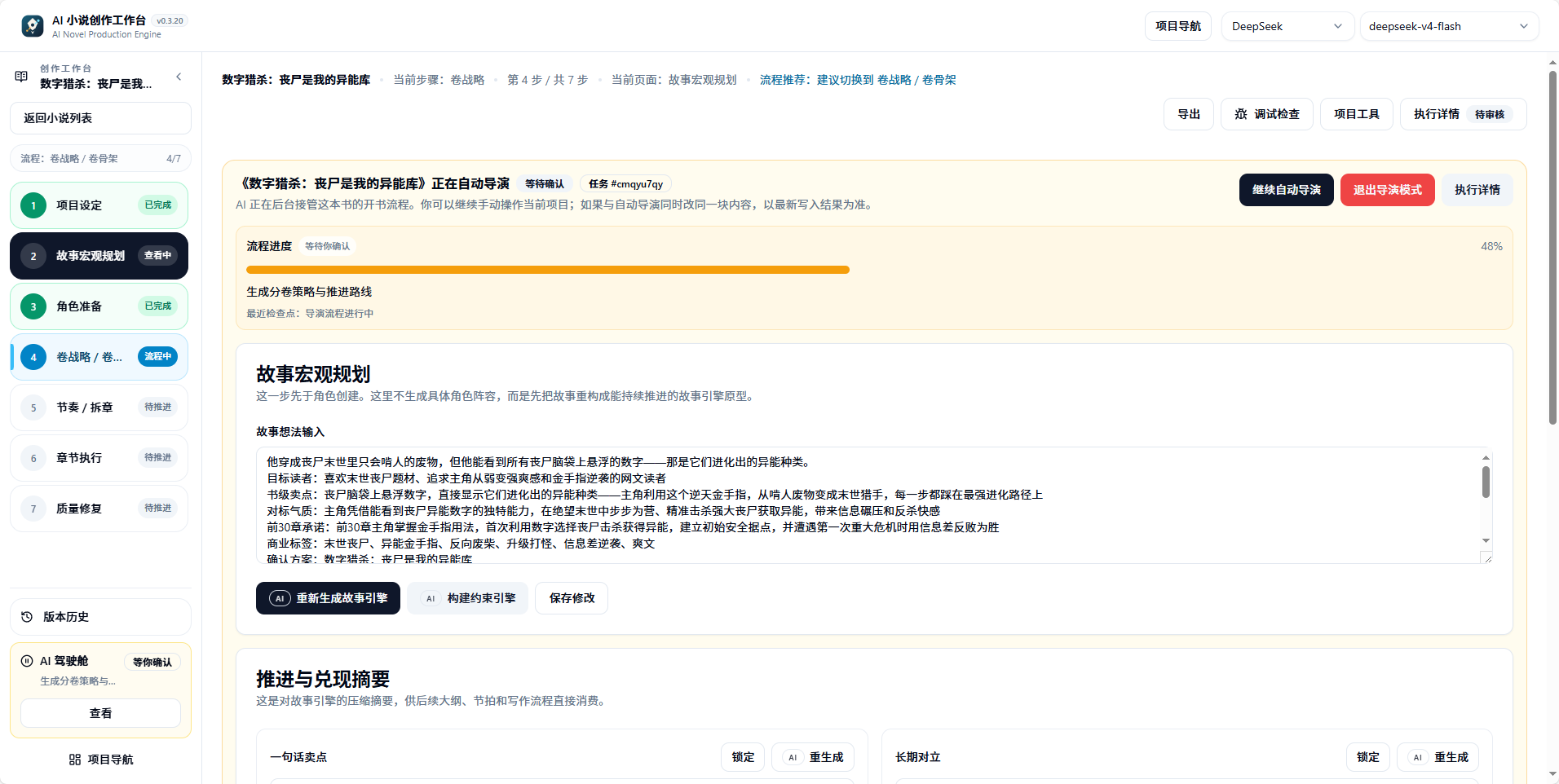
AI cockpit running state: current stage shown at the top, step progress displayed on the left
How to Read Recovery Entries
Director Follow-up tries to map recovery actions to specific entry points:
Recovery Action
Applicable Situation
Entry Point
Return to direction selection
Candidate directions or titles pending confirmation
Direction selection page
Supplement novel basic information
Book contract, world, or character data missing
Novel basic information page
Continue character or world preparation
Asset preparation paused at confirmation point
Character page, world asset page
Enter chapter tasks
Chapter batch is ready
Chapter execution entry
Retry failed task
A background command execution failed
Retry button within Director Follow-up
Accept warning and continue
Low-risk quality fix has been handled
”Continue Auto Director” in Director Follow-up
If multiple entries exist, prioritize the one marked as recommended by the system. Do not repeatedly trigger the same stage task from multiple pages at the same time.
1
Open Director Follow-up
Open “Director Follow-up” in the left sidebar, read the current pause reason and recommended action.
2
Check Run History
Switch to Run History to confirm the latest task status and error details.
3
Select Recovery Entry
Follow the recommended entry in Director Follow-up: confirm, retry, continue, or take over.
4
Continue Auto Director
After resolving the issue, click “Continue Auto Director” to resume from the original checkpoint.
Continue Auto Director
“Continue Auto Director” (继续自动导演) is the core action in Director Follow-up. After clicking, the system resumes execution from the most recent checkpoint, using the run mode and issue handling rules saved for this book.Before continuing, confirm:
The pause reason has been resolved (balance replenished, model switched, candidates confirmed)
No high-memory task in the same scope is currently running
You are not repeatedly launching multiple commands for the same stage
Do not directly exit director mode or delete the project. Most pauses can be resolved through confirmation, retry, or a continue entry.
Takeover Actions
Takeover is used when novel assets already exist but the director main chain was interrupted. The system derives the resumable stage from existing assets, rather than rebuilding from scratch.
Scenario
What to Do After Takeover
Characters and world exist, but volume planning has not started
Derive entry into the volume strategy stage
Volume planning exists, but chapter refinement was interrupted
Resume from the beat board or chapter checklist
Some chapter body text already exists
Continue from the chapter execution chain; saved body text will not be regenerated
Takeover will not overwrite existing assets. It only rebuilds the director task state and locates the most recent checkpoint.
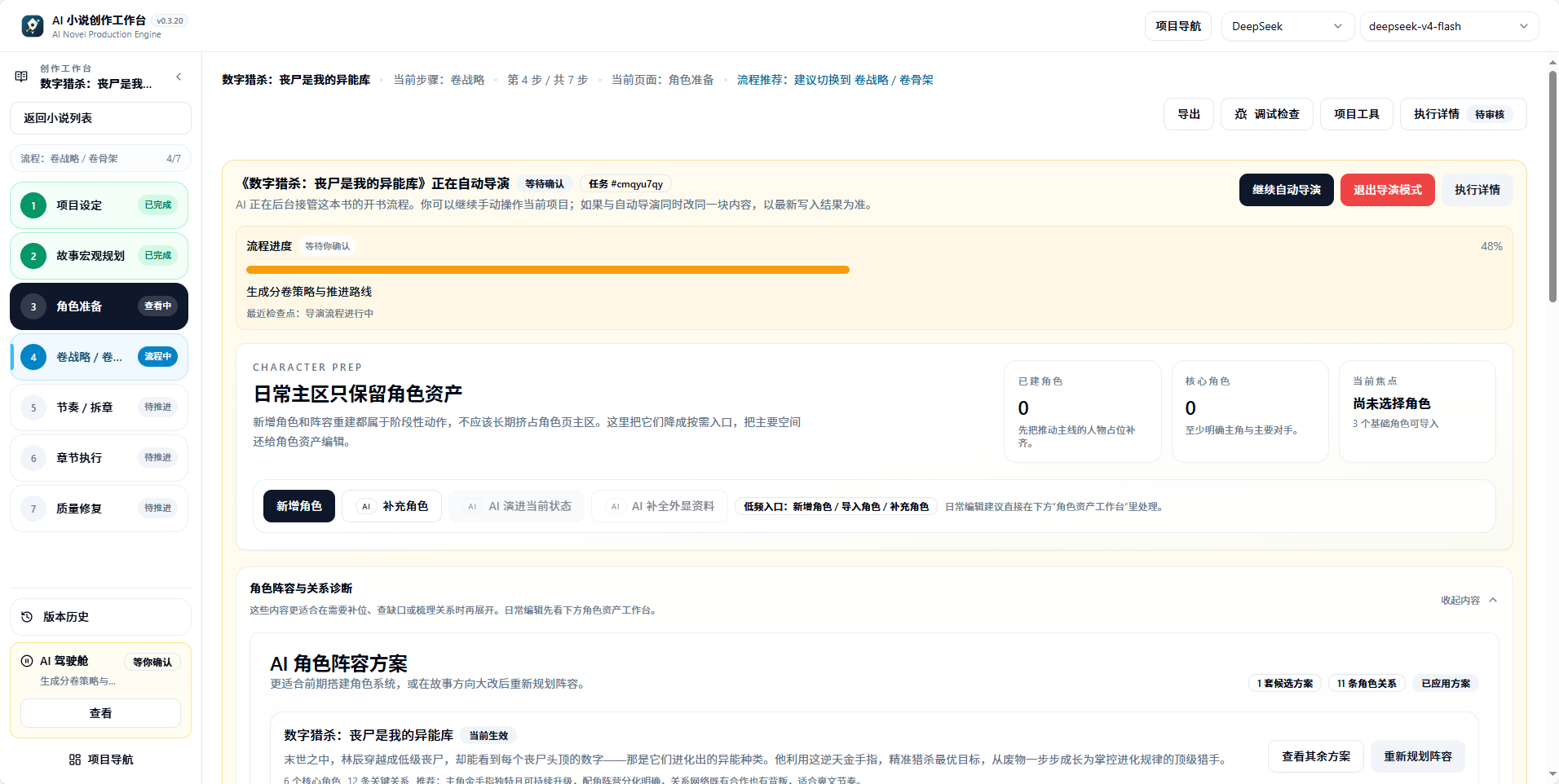
AI cockpit character preparation page: when paused at the character stage, the background may have already advanced to subsequent steps
Book Issue Handling Preferences
A novel project can inherit global issue handling rules, or have its own selection for this book:
Strategy
Suitable For
When a chapter has available body text but still has local issues
Prioritize completing the book
More emphasis on finishing the whole book first
Save body text, record quality debt, and continue
Quality-first
More emphasis on chapter-by-chapter confirmation
Pause processing, wait for your confirmation before continuing
Both strategies auto-process at most once. You can also set each item to “auto-retry, remind then continue, pause processing, or end task,” or click “restore global inheritance” to return to unified rules.Book rules are saved with the project at task start. Subsequent resumes will continue using this book’s own choice, and will not silently change processing tasks due to global setting changes.
Model Balance and Quota Pauses
When model services return balance insufficient, quota insufficient, or explicit rate-limit errors, Director Follow-up and execution details will prioritize showing the real model reason and recovery entry.Processing order:
Record the first unfinished chapter and current saved boundary
Go to model settings to replenish balance, fix connection, or switch models
Return to Director Follow-up and confirm the pause reason has been resolved
Use the recovery entry to continue; do not re-initiate already completed chapter ranges
Saved body text will not be regenerated due to this type of pause. If this book’s rules require manual processing, background resume will also retain the paused state, waiting for your explicit continue.
Switching Run Strategy
Run mode can be adjusted in Director Follow-up’s “Continue Auto Director” or takeover actions:
Strategy
When to Switch
Impact
Fully automatic to stage-by-stage confirmation
When you want to add manual review nodes
Subsequent stages pause at confirmation points
Stage-by-stage confirmation to fully automatic
When you are confident in planning quality
Low-risk points auto-continue
Enable or disable quality fix toggle
Adjust body text output standards
Whether chapters enter review and fix after completion
Switching will not lose completed stage outputs; it only changes the auto-approval boundaries for subsequent stages.
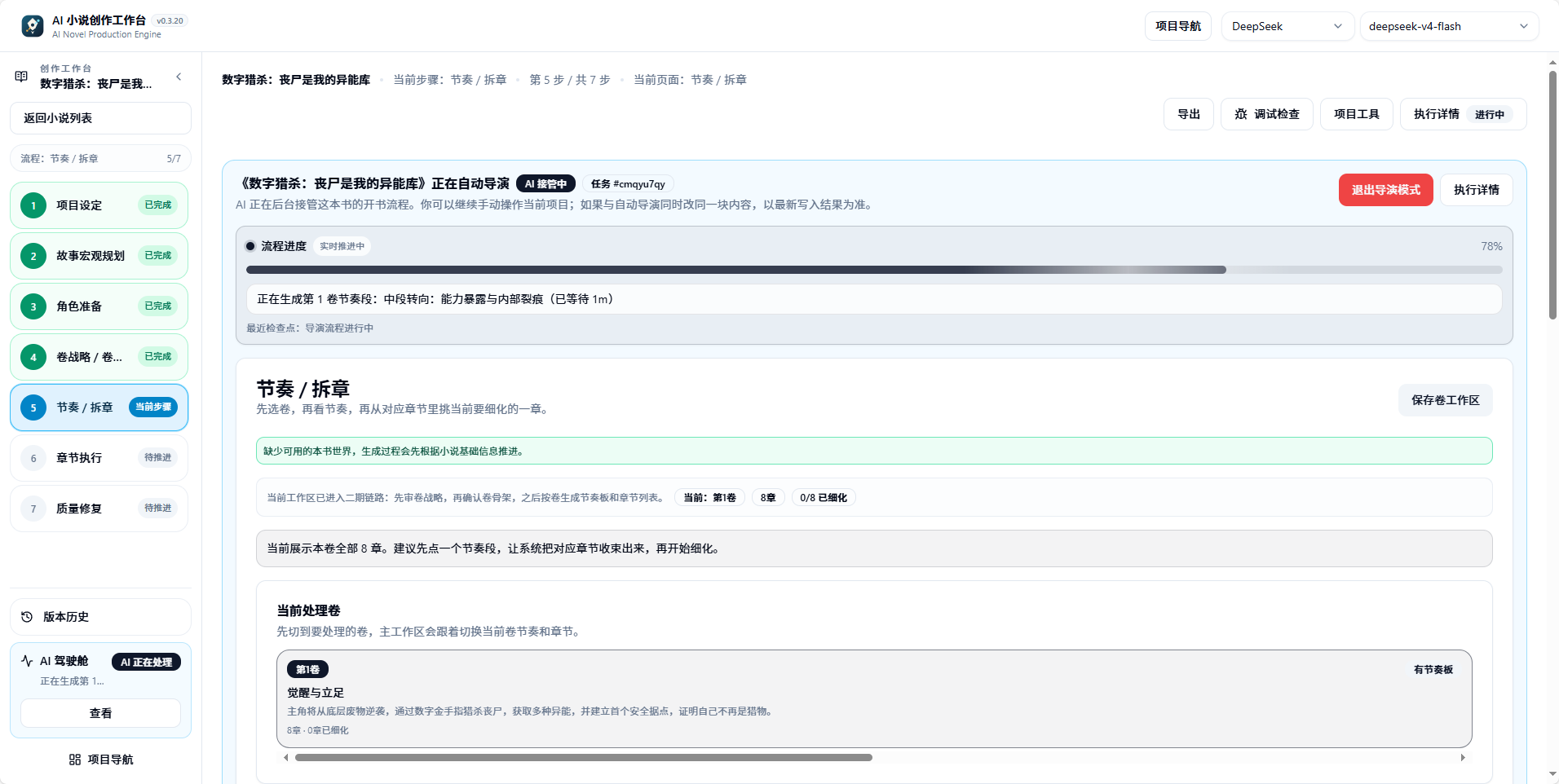
Beat board stage: volume planning split into executable chapter tasks
Checkpoint Types
The most important role of Director Follow-up is to translate the Auto Director’s current checkpoint into user-executable actions.
Checkpoint
Page Meaning
Common Stage
User Action
Waiting for direction selection
Waiting to confirm book-level direction
Candidate directions, candidate titles
Choose a direction, revise candidates, or redo the title
Character generation, character lineup application
Confirm, merge, redo, or supplement characters
Volume strategy ready
Volume strategy ready
Volume strategy, volume skeleton
Confirm, then enter beat chapter splitting
Chapter batch ready
Chapter batch executable
Beat board, chapter checklist, chapter refinement
Enter chapter execution or authorize auto chapter writing
Needs re-planning
Needs quality fix or re-planning
Review fix, quality loop
View reason, decide to fix, continue, or re-plan
Flow complete
Director main flow complete
Global or batch end
View results and subsequent recommendations
Rewrite snapshot established
Pre-rewrite backup complete
Rewrite/regeneration
Confirm cleanup, then continue
When the status is “waiting for confirmation,” the system is usually waiting for you to confirm direction, characters, volume planning, chapter execution, or fix strategy. Check Director Follow-up first; do not delete or recreate the project.
Pause Reason to Recovery Entry
Pause Reason
Description
Recommended Entry
Candidate directions pending confirmation
Candidate directions or title sets complete
Direction selection page
Character preparation pending confirmation
Character lineup may need manual confirmation
Character candidate page, Director Follow-up
Volume strategy pending confirmation
Volume-level route and skeleton complete
Volume planning entry
Chapter batch ready
Beat board, checklist, and refinement complete
Director Follow-up, chapter execution entry
Low-risk quality fix
Chapter is fixable but needs authorization to continue
Chapter page, Director Follow-up
Needs re-planning
Subsequent plan may need changes
Director Follow-up, stage-by-stage recovery guide
Worker interrupted
Background lease expired or service restarted
Confirm status in Run History, then return to source page to resume
High-memory task conflict
Same book, same scope already has beat board or chapter splitting task running
Run History to view currently running tasks
Auto-Approval Configuration
Auto-approval allows the system to automatically continue at designated low-risk confirmation points. Common points include:
Approval Point
Corresponding Action
Risk
Direction confirmed
Confirm candidate direction, then continue building the book
Low
Characters ready
After character lineup passes, continue volume strategy
Low
Volume strategy ready
After volume strategy passes, continue beat chapter splitting
Low
Structured outline ready
After chapter tasks are prepared, continue writing
Low
Continue chapter execution
After one chapter batch completes, continue remaining chapters
Medium
Continue after low-risk quality fix
After low-risk quality fix, continue
Medium
Continue after re-planning
After re-planning processing, continue
High
Rewrite cleanup confirmed
After rewrite cleanup confirmation, continue
High
By default, it is more suitable to auto-pass low-risk planning points. When re-planning, rewrite cleanup, or large-scale body text changes are involved, manual confirmation is recommended.
Relationship with Run History
Run History answers “what happened to background tasks”; Director Follow-up answers “what should the whole book do next.”Recommended workflow:
See task pause in Director Follow-up
Go to Run History to view latest task status and error information
Return to Director Follow-up to select recovery action
Continue Auto Director or chapter execution
If Run History shows running, Director Follow-up may not present new confirmation items for the time being.
Recommended Handling Strategy
When encountering a pause, judge in this order:
Is it just waiting for you to choose candidates
Is there a retryable background task
Is there already available chapter content
Is local fix needed
Is explicit re-planning required
Only explicit re-planning, unrecoverable generation failure, data integrity risk, or system security issues should stop the global chain.
Beginner Tips
If you don’t understand the pause message, don’t manually clear data. Do two things first:
Check the latest status in Run History
Return to the novel page to confirm basic information and candidates
Most pauses can be resolved through confirmation, retry, or a continue entry.
Frequently Asked Questions
Director Follow-up shows paused, but Run History shows the task is complete?
“Complete” in Run History only means that background command has ended. Director Follow-up showing paused means the current checkpoint requires your confirmation to continue to the next stage. Click the recommended entry in Director Follow-up to handle it.
Nothing happens after clicking continue?
First refresh the page to view the latest status. If Run History shows the task is queuing or running, the background has received the command and is waiting for execution to complete. Do not repeatedly click “Continue Auto Director.”
Will switching this book's issue handling rules affect already generated chapters?
No. Rules are saved with the project at task start; subsequent resumes continue using this book’s own choice. Saved chapter body text will not be regenerated.
Why are there multiple recovery entries?
Different pause reasons correspond to different creative contexts. The system will mark the recommended entry; prioritize selecting that entry. If unsure, follow the “check Run History -> return to Director Follow-up and select recommended entry” sequence.
What is the difference between takeover and continue?
“Continue” is used when the director main chain exists but is paused, resuming from the most recent checkpoint. “Takeover” is used when the director task state is lost or needs rebuilding, deriving the resumable stage from existing assets.
Can I skip a checkpoint?
Not recommended. Each checkpoint corresponds to a quality gate, especially character confirmation and volume strategy confirmation. Skipping may lead to decreased quality in subsequent chapters. If auto-approval is enabled, low-risk points will auto-pass.
Will re-planning delete existing content?
It will not auto-delete. The system will create a snapshot before re-planning; you can confirm cleanup before continuing. Saved body text, characters, and world assets are retained by default.
What is the relationship between Director Follow-up and notifications?
Notifications are responsible for reminding: task paused, waiting for confirmation, resumable, quality issues need handling. Director Follow-up is responsible for explaining: why paused, which checkpoint it stopped at, and what the next entry is. When you see a notification, enter Director Follow-up first to view details.
Auto Director
Learn about director versions, run modes, and stage flows
Run History
View background task status and error details
Chapter Execution
From chapter batch ready to body text generation
{"docsConfig":{"theme":"mint","$schema":"https://mintlify.com/docs.json","name":"Biz Novel Studio","description":"AI 小说创作工作台官方文档:从一句灵感,走向一本完整小说","colors":{"primary":"#16A34A"},"logo":{"light":"https://mintcdn.com/ai-novel-writing-assistant/EPaSP-_4jKaBdGvV/images/logo.svg?fit=max\u0026auto=format\u0026n=EPaSP-_4jKaBdGvV\u0026q=85\u0026s=46d743075cfdc9207d8e72dddacb3816","dark":"https://mintcdn.com/ai-novel-writing-assistant/EPaSP-_4jKaBdGvV/images/logo.svg?fit=max\u0026auto=format\u0026n=EPaSP-_4jKaBdGvV\u0026q=85\u0026s=46d743075cfdc9207d8e72dddacb3816"},"favicon":"https://mintcdn.com/ai-novel-writing-assistant/7vj_6BsfIDYV0gE1/favicon.svg?fit=max\u0026auto=format\u0026n=7vj_6BsfIDYV0gE1\u0026q=85\u0026s=12098b66b0b262a33bf09e2d4558228f","navbar":{"links":[{"href":"https://github.com/ExplosiveCoderflome/AI-Novel-Writing-Assistant/releases","label":"下载"},{"href":"https://github.com/ExplosiveCoderflome/AI-Novel-Writing-Assistant/issues","label":"问题反馈"}],"primary":{"type":"github","href":"https://github.com/ExplosiveCoderflome/AI-Novel-Writing-Assistant"}},"footer":{"socials":{"github":"https://github.com/ExplosiveCoderflome/AI-Novel-Writing-Assistant"},"links":[{"header":"开始","items":[{"label":"安装与启动","href":"/installation"},{"label":"快速开始","href":"/quickstart"},{"label":"第一本小说实战","href":"/guides/first-novel-walkthrough"}]},{"header":"社区","items":[{"label":"GitHub","href":"https://github.com/ExplosiveCoderflome/AI-Novel-Writing-Assistant"},{"label":"问题反馈","href":"https://github.com/ExplosiveCoderflome/AI-Novel-Writing-Assistant/issues"},{"label":"参与贡献","href":"/developers/contributing"}]},{"header":"更新","items":[{"label":"更新日志","href":"/changelog"},{"label":"路线图","href":"/roadmap"},{"label":"下载最新版","href":"https://github.com/ExplosiveCoderflome/AI-Novel-Writing-Assistant/releases"}]}]},"seo":{"metatags":{"author":"ExplosiveCoderflome","keywords":"AI 小说,AI 写小说,AI 小说创作,长篇小说生成,短篇小说,小说写作助手,开源,Biz Novel Studio,AI-Novel-Writing-Assistant,AI Novel Writing Assistant,AI novel writing assistant","language":"zh-CN","og:locale":"zh_CN","theme-color":"#05080a","application-name":"Biz Novel Studio","og:site_name":"Biz Novel Studio","twitter:card":"summary_large_image"}},"contextual":{"options":["copy","view","chatgpt","claude","perplexity"],"display":"header"},"styling":{"latex":false},"navigation":{"languages":[{"language":"zh-Hans","default":true,"href":""},{"language":"en","href":"en"}]}},"deployment":{"deploymentMetadataValue":{"subdomain":"ai-novel-writing-assistant","hasAudioNarration":false,"actualSubdomain":"ai-novel-writing-assistant","customDomains":[],"gitSource":{"type":"github","owner":"explosivecoderflome","repo":"ai-novel-writing-assistant","deployBranch":"main","contentDirectory":"mintlify-docs","isPrivate":false,"mountPath":"","label":"","_id":"6af42d9d566700d04eef0454"},"entitlements":{"AI_CHAT":{"status":"ENABLED"},"WEB_MCP":{"status":"ENABLED"},"NARRATION":{"status":"ENABLED"}},"buildId":"6af72c53e766df7985e6a138","clientVersion":"0.0.4128","searchFilterCounts":[{"language":"zh-Hans","tag":"开始使用","count":9},{"language":"en","tag":"Get started","count":9},{"language":"zh-Hans","tag":"长篇与短篇创作","count":8},{"language":"en","tag":"Long and short fiction","count":8},{"language":"zh-Hans","tag":"世界、角色与写法","count":7},{"language":"en","tag":"Worlds, characters and style","count":7},{"language":"zh-Hans","tag":"帮助","count":5},{"language":"en","tag":"Help","count":5},{"language":"zh-Hans","tag":"开发者","count":4},{"language":"zh-Hans","tag":"资料与辅助","count":4},{"language":"en","tag":"Developers","count":4},{"language":"en","tag":"Research and assistance","count":4},{"language":"zh-Hans","tag":"衍生创作","count":2},{"language":"zh-Hans","tag":"创作原理","count":2},{"language":"zh-Hans","tag":"实战手册","count":2},{"language":"en","tag":"Adaptations","count":2},{"language":"en","tag":"How it works","count":2},{"language":"en","tag":"Playbooks","count":2}]},"assistantConfig":{"enableAskAiButton":false,"enableStarterQuestions":false,"enableContextualStarterQuestions":false,"enableAskAiSearchBar":true},"basePath":"","hasChatPermissions":true,"hasWebMcpPermissions":true,"toggles":[{"name":"kill-isr","enabled":true,"variant":{"name":"disabled","enabled":false,"feature_enabled":true},"impressionData":false},{"name":"custom-rbac-roles","enabled":true,"variant":{"name":"disabled","enabled":false,"feature_enabled":true},"impressionData":false},{"name":"agent-mintlify-slack","enabled":true,"variant":{"name":"disabled","enabled":false,"feature_enabled":true},"impressionData":false},{"name":"agent-integrations-settings","enabled":true,"variant":{"name":"disabled","enabled":false,"feature_enabled":true},"impressionData":false},{"name":"rbac-expansion","enabled":true,"variant":{"name":"disabled","enabled":false,"feature_enabled":true},"impressionData":false},{"name":"automations-pr-grouping","enabled":true,"variant":{"name":"disabled","enabled":false,"feature_enabled":true},"impressionData":false},{"name":"custom-prefix","enabled":true,"variant":{"name":"disabled","enabled":false,"feature_enabled":true},"impressionData":false},{"name":"analytics-v7","enabled":true,"variant":{"name":"disabled","enabled":false,"feature_enabled":true},"impressionData":false},{"name":"user-flows-analytics","enabled":true,"variant":{"name":"disabled","enabled":false,"feature_enabled":true},"impressionData":false},{"name":"no-publish-flow","enabled":true,"variant":{"name":"disabled","enabled":false,"feature_enabled":true},"impressionData":false},{"name":"workos-onboarding","enabled":true,"variant":{"name":"disabled","enabled":false,"feature_enabled":true},"impressionData":false},{"name":"snapshot-serving-live","enabled":true,"variant":{"name":"disabled","enabled":false,"feature_enabled":true},"impressionData":false},{"name":"stripTemperatureMiddleware","enabled":true,"variant":{"name":"disabled","enabled":false,"feature_enabled":true},"impressionData":false},{"name":"support-platform-pylon-zendesk","enabled":true,"variant":{"name":"disabled","enabled":false,"feature_enabled":true},"impressionData":false},{"name":"snapshot-serving","enabled":true,"variant":{"name":"disabled","enabled":false,"feature_enabled":true},"impressionData":false},{"name":"instant-rollback","enabled":true,"variant":{"name":"disabled","enabled":false,"feature_enabled":true},"impressionData":false},{"name":"granular-notifications-server","enabled":true,"variant":{"name":"disabled","enabled":false,"feature_enabled":true},"impressionData":false},{"name":"granular-notifications","enabled":true,"variant":{"name":"disabled","enabled":false,"feature_enabled":true},"impressionData":false},{"name":"automations-fable","enabled":true,"variant":{"name":"disabled","enabled":false,"feature_enabled":true},"impressionData":false},{"name":"fixed-ai-action-pricing","enabled":true,"variant":{"name":"disabled","enabled":false,"feature_enabled":true},"impressionData":false},{"name":"automation-resolve-merge-conflict","enabled":true,"variant":{"name":"disabled","enabled":false,"feature_enabled":true},"impressionData":false},{"name":"scoped-publishing","enabled":true,"variant":{"name":"disabled","enabled":false,"feature_enabled":true},"impressionData":false},{"name":"mintql","enabled":true,"variant":{"name":"disabled","enabled":false,"feature_enabled":true},"impressionData":false},{"name":"page-level-analytics","enabled":true,"variant":{"name":"disabled","enabled":false,"feature_enabled":true},"impressionData":false},{"name":"editor-version-history-v2","enabled":true,"variant":{"name":"disabled","enabled":false,"feature_enabled":true},"impressionData":false},{"name":"billing-page-v2","enabled":true,"variant":{"name":"disabled","enabled":false,"feature_enabled":true},"impressionData":false},{"name":"full-page-search","enabled":true,"variant":{"name":"disabled","enabled":false,"feature_enabled":true},"impressionData":false},{"name":"workspace-projects","enabled":true,"variant":{"name":"disabled","enabled":false,"feature_enabled":true},"impressionData":false},{"name":"assistant-v5","enabled":true,"variant":{"name":"disabled","enabled":false,"feature_enabled":true},"impressionData":false},{"name":"fork-pr-previews","enabled":true,"variant":{"name":"disabled","enabled":false,"feature_enabled":true},"impressionData":false},{"name":"revalidation-jwt","enabled":true,"variant":{"name":"disabled","enabled":false,"feature_enabled":true},"impressionData":false},{"name":"workos-sso-scim","enabled":true,"variant":{"name":"disabled","enabled":false,"feature_enabled":true},"impressionData":false},{"name":"hobby-abuse-scan","enabled":true,"variant":{"name":"disabled","enabled":false,"feature_enabled":true},"impressionData":false},{"name":"dashboard-inbox","enabled":true,"variant":{"name":"disabled","enabled":false,"feature_enabled":true},"impressionData":false},{"name":"workos-signup","enabled":true,"variant":{"name":"disabled","enabled":false,"feature_enabled":true},"impressionData":false},{"name":"turbopuffer-dual-write","enabled":true,"variant":{"name":"disabled","enabled":false,"feature_enabled":true},"impressionData":false},{"name":"workos-enabled","enabled":true,"variant":{"name":"disabled","enabled":false,"feature_enabled":true},"impressionData":false},{"name":"approve-review-flow","enabled":true,"variant":{"name":"disabled","enabled":false,"feature_enabled":true},"impressionData":false},{"name":"editor-metadata","enabled":true,"variant":{"name":"disabled","enabled":false,"feature_enabled":true},"impressionData":false},{"name":"sso-setup-deadline-banner","enabled":true,"variant":{"name":"disabled","enabled":false,"feature_enabled":true},"impressionData":false},{"name":"turbopuffer-serve","enabled":true,"variant":{"name":"disabled","enabled":false,"feature_enabled":true},"impressionData":false},{"name":"live-agents","enabled":true,"variant":{"name":"disabled","enabled":false,"feature_enabled":true},"impressionData":false},{"name":"llms-txt-v2","enabled":true,"variant":{"name":"disabled","enabled":false,"feature_enabled":true},"impressionData":false}],"googleFontsInlined":false},"customCss":[{"filePath":"style.css","content":"html:has(.bnh[data-bn-theme]) #navbar,html:has(.bnh[data-bn-theme]) [data-layout-item=\"topbar\"]{box-shadow:none!important;border-color:transparent!important;transition:background-color .8s ease, color .8s ease, border-color .8s ease!important}html:has(.bnh[data-bn-theme]) #navbar div,html:has(.bnh[data-bn-theme]) #navbar nav,html:has(.bnh[data-bn-theme]) [data-layout-item=\"topbar\"] div{background-color:transparent!important;background-image:none!important;box-shadow:none!important;border-color:transparent!important}html:has(.bnh[data-bn-theme]) #navbar a,html:has(.bnh[data-bn-theme]) #navbar button,html:has(.bnh[data-bn-theme]) #navbar span,html:has(.bnh[data-bn-theme]) #navbar svg{transition:color .3s ease, background-color .3s ease, border-color .3s ease, text-shadow .3s ease, fill .3s ease!important}html:has(.bnh[data-bn-theme]) #navbar::after{content:\"\";position:absolute;left:0;right:0;bottom:0;height:1px;pointer-events:none;transition:background .8s ease}html:has(.bnh[data-bn-theme]),html:has(.bnh[data-bn-theme]) body{transition:background-color .8s ease}html:has(.bnh[data-bn-theme]) #banner{display:none!important}html:has(.bnh[data-bn-theme=\"ink\"]),html:has(.bnh[data-bn-theme=\"ink\"]) body{background-color:#05080a!important}html:has(.bnh[data-bn-theme=\"ink\"]) #navbar,html:has(.bnh[data-bn-theme=\"ink\"]) [data-layout-item=\"topbar\"]{background-color:#05080a!important;background-image:radial-gradient(1200px 420px at 20% 160%, rgba(22, 163, 74, .26), transparent 70%)!important;backdrop-filter:blur(12px) saturate(140%)!important;-webkit-backdrop-filter:blur(12px) saturate(140%)!important;color:#e5f6ea!important}html:has(.bnh[data-bn-theme=\"ink\"]) #navbar::after{background:linear-gradient(90deg, transparent, rgba(74, 222, 128, .22), transparent)}html:has(.bnh[data-bn-theme=\"ink\"]) #navbar a,html:has(.bnh[data-bn-theme=\"ink\"]) #navbar button,html:has(.bnh[data-bn-theme=\"ink\"]) #navbar span,html:has(.bnh[data-bn-theme=\"ink\"]) #navbar svg{color:rgba(229, 246, 234, .78)!important}html:has(.bnh[data-bn-theme=\"ink\"]) #navbar svg path[fill]:not([fill=\"none\"]){fill:currentColor!important}html:has(.bnh[data-bn-theme=\"ink\"]) #navbar a:hover,html:has(.bnh[data-bn-theme=\"ink\"]) #navbar button:hover,html:has(.bnh[data-bn-theme=\"ink\"]) #navbar a:hover span,html:has(.bnh[data-bn-theme=\"ink\"]) #navbar button:hover svg{color:#86efac!important;text-shadow:0 0 12px rgba(74, 222, 128, .7)}html:has(.bnh[data-bn-theme=\"ink\"]) #navbar a[href=\"/\"],html:has(.bnh[data-bn-theme=\"ink\"]) #navbar a[href=\"/\"] *{color:#e5f6ea!important;font-weight:700;letter-spacing:.04em}html:has(.bnh[data-bn-theme=\"ink\"]) #navbar [data-search-item=\"trigger\"],html:has(.bnh[data-bn-theme=\"ink\"]) #navbar #search-bar-entry,html:has(.bnh[data-bn-theme=\"ink\"]) #navbar #assistant-entry,html:has(.bnh[data-bn-theme=\"ink\"]) #navbar [data-layout-item=\"search-entry\"],html:has(.bnh[data-bn-theme=\"ink\"]) #navbar [data-layout-item=\"assistant-entry\"]{background-color:rgba(22, 163, 74, .08)!important;border:1px solid rgba(134, 239, 172, .28)!important;color:rgba(229, 246, 234, .7)!important;box-shadow:none!important}html:has(.bnh[data-bn-theme=\"ink\"]) #navbar [data-search-item=\"trigger\"]:hover,html:has(.bnh[data-bn-theme=\"ink\"]) #navbar #search-bar-entry:hover,html:has(.bnh[data-bn-theme=\"ink\"]) #navbar #assistant-entry:hover{border-color:rgba(134, 239, 172, .6)!important;box-shadow:0 0 18px -4px rgba(34, 197, 94, .7)!important}html:has(.bnh[data-bn-theme=\"paper\"]),html:has(.bnh[data-bn-theme=\"paper\"]) body{background-color:#f3ede1!important}html:has(.bnh[data-bn-theme=\"paper\"]) #navbar,html:has(.bnh[data-bn-theme=\"paper\"]) [data-layout-item=\"topbar\"]{background-color:#f3ede1!important;background-image:url(\"data:image/svg+xml;utf8,\u003csvg xmlns='http://www.w3.org/2000/svg' width='240' height='240'>\u003cfilter id='n'>\u003cfeTurbulence type='fractalNoise' baseFrequency='.75' numOctaves='3' stitchTiles='stitch'/>\u003cfeColorMatrix values='0 0 0 0 .35 0 0 0 0 .28 0 0 0 0 .18 0 0 0 .09 0'/>\u003c/filter>\u003crect width='100%' height='100%' filter='url(%23n)'/>\u003c/svg>\")!important;backdrop-filter:blur(10px)!important;-webkit-backdrop-filter:blur(10px)!important;color:#1c1a17!important;font-family:\"Noto Serif SC\", \"Songti SC\", \"STSong\", serif!important}html:has(.bnh[data-bn-theme=\"paper\"]) #navbar::after{background:linear-gradient(90deg, transparent, rgba(28, 26, 23, .14) 20%, rgba(28, 26, 23, .14) 80%, transparent)}html:has(.bnh[data-bn-theme=\"paper\"]) #navbar a,html:has(.bnh[data-bn-theme=\"paper\"]) #navbar button,html:has(.bnh[data-bn-theme=\"paper\"]) #navbar span,html:has(.bnh[data-bn-theme=\"paper\"]) #navbar svg{color:rgba(28, 26, 23, .78)!important;font-family:\"Noto Serif SC\", \"Songti SC\", \"STSong\", serif!important}html:has(.bnh[data-bn-theme=\"paper\"]) #navbar svg path[fill]:not([fill=\"none\"]){fill:currentColor!important}html:has(.bnh[data-bn-theme=\"paper\"]) #navbar a:hover,html:has(.bnh[data-bn-theme=\"paper\"]) #navbar button:hover,html:has(.bnh[data-bn-theme=\"paper\"]) #navbar a:hover span,html:has(.bnh[data-bn-theme=\"paper\"]) #navbar button:hover svg{color:#b4382a!important}html:has(.bnh[data-bn-theme=\"paper\"]) #navbar a[href=\"/\"],html:has(.bnh[data-bn-theme=\"paper\"]) #navbar a[href=\"/\"] *{color:#1c1a17!important;font-weight:700;letter-spacing:.06em}html:has(.bnh[data-bn-theme=\"paper\"]) #navbar [data-search-item=\"trigger\"],html:has(.bnh[data-bn-theme=\"paper\"]) #navbar #search-bar-entry,html:has(.bnh[data-bn-theme=\"paper\"]) #navbar #assistant-entry,html:has(.bnh[data-bn-theme=\"paper\"]) #navbar [data-layout-item=\"search-entry\"],html:has(.bnh[data-bn-theme=\"paper\"]) #navbar [data-layout-item=\"assistant-entry\"]{background-color:#faf6ec!important;border:1px solid rgba(28, 26, 23, .3)!important;border-radius:4px!important;color:rgba(28, 26, 23, .65)!important;box-shadow:none!important}html:has(.bnh[data-bn-theme=\"paper\"]) #navbar [data-search-item=\"trigger\"]:hover,html:has(.bnh[data-bn-theme=\"paper\"]) #navbar #search-bar-entry:hover,html:has(.bnh[data-bn-theme=\"paper\"]) #navbar #assistant-entry:hover{border-color:#b4382a!important}"}],"page":{"pagePath":"en/features/director-follow-up","slug":"/en/features/director-follow-up","pageMetadata":{"title":"Director Follow-up","description":"View Auto Director pause reasons, recovery entry points, and next-step recommendations; resume from checkpoints or take over existing projects.","sidebarTitle":"Director Follow-up","icon":"clapperboard","keywords":["Director Follow-up","Auto Director pause","recovery entry","checkpoint","take over","Continue Auto Director","Run History","quality issues"],"href":"/en/features/director-follow-up"},"description":{"compiledSource":"\"use strict\";\nconst {jsx: _jsx} = arguments[0];\nconst {useMDXComponents: _provideComponents} = arguments[0];\nfunction _createMdxContent(props) {\n const _components = {\n p: \"p\",\n ..._provideComponents(),\n ...props.components\n };\n return _jsx(_components.p, {\n children: \"View Auto Director pause reasons, recovery entry points, and next-step recommendations; resume from checkpoints or take over existing projects.\"\n });\n}\nfunction MDXContent(props = {}) {\n const {wrapper: MDXLayout} = {\n ..._provideComponents(),\n ...props.components\n };\n return MDXLayout ? _jsx(MDXLayout, {\n ...props,\n children: _jsx(_createMdxContent, {\n ...props\n })\n }) : _createMdxContent(props);\n}\nreturn {\n default: MDXContent\n};\n","frontmatter":{},"scope":{}},"pageType":"default","mdx":{"mdxSource":{"compiledSource":"\"use strict\";const{Fragment:_Fragment,jsx:_jsx,jsxs:_jsxs}=arguments[0];const{useMDXComponents:_provideComponents}=arguments[0];function _createMdxContent(props){const _components={li:`li`,ol:`ol`,p:`p`,tbody:`tbody`,td:`td`,th:`th`,thead:`thead`,tr:`tr`,ul:`ul`,..._provideComponents(),...props.components},{Accordion,AccordionGroup,Card,CardGroup,Frame,Heading,Info,OptimizedImage,Step,Steps,Table,Warning}=_components;if(!Accordion)_missingMdxReference(`Accordion`,true);if(!AccordionGroup)_missingMdxReference(`AccordionGroup`,true);if(!Card)_missingMdxReference(`Card`,true);if(!CardGroup)_missingMdxReference(`CardGroup`,true);if(!Frame)_missingMdxReference(`Frame`,true);if(!Heading)_missingMdxReference(`Heading`,true);if(!Info)_missingMdxReference(`Info`,true);if(!OptimizedImage)_missingMdxReference(`OptimizedImage`,true);if(!Step)_missingMdxReference(`Step`,true);if(!Steps)_missingMdxReference(`Steps`,true);if(!Table)_missingMdxReference(`Table`,true);if(!Warning)_missingMdxReference(`Warning`,true);return _jsxs(_Fragment,{children:[_jsx(_components.p,{children:`Director Follow-up is used to view the Auto Director’s execution progress, pause reasons, recovery entry points, and next-step recommendations. It helps you understand where a book’s main chain has stopped and provides clear actions to continue.`}),`\n`,_jsxs(CardGroup,{cols:2,children:[_jsx(Card,{title:`View Pause Reasons`,icon:`circle-pause`,href:`#common-pause-reasons`,children:_jsx(_components.p,{children:`Distinguish between waiting for confirmation, local quality issues, and issues that require stopping the main chain.`})}),_jsx(Card,{title:`Continue Auto Director`,icon:`play`,href:`#how-to-read-recovery-entries`,children:_jsx(_components.p,{children:`Resume from checkpoints, retry failed tasks, or continue after accepting warnings.`})}),_jsx(Card,{title:`Switch Run Strategy`,icon:`sliders`,href:`#book-issue-handling-preferences`,children:_jsx(_components.p,{children:`Choose a completion-first or quality-first approach for a single book.`})}),_jsx(Card,{title:`Take Over Existing Projects`,icon:`hand`,href:`#takeover-actions`,children:_jsx(_components.p,{children:`When novel assets already exist, derive the resumable stage from the current state.`})})]}),`\n`,_jsx(Heading,{level:`2`,id:`when-to-open-director-follow-up`,children:`When to Open Director Follow-up`}),`\n`,_jsxs(_components.ul,{children:[`\n`,_jsx(_components.li,{children:`The Auto Director prompts you to wait for confirmation`}),`\n`,_jsx(_components.li,{children:`You want to continue after a book-start flow was interrupted`}),`\n`,_jsx(_components.li,{children:`Chapter preparation or execution has no continue entry`}),`\n`,_jsx(_components.li,{children:`Run History shows director-related tasks failed or waiting to resume`}),`\n`,_jsx(_components.li,{children:`You want to know what the system recommends as the next step`}),`\n`]}),`\n`,_jsx(_components.p,{children:`If you only want to check whether background tasks are complete, look at Run History first. If you want to know why the Auto Director stopped, open Director Follow-up.`}),`\n`,_jsx(Heading,{level:`2`,id:`common-pause-reasons`,children:`Common Pause Reasons`}),`\n`,_jsx(_components.p,{children:`An Auto Director pause is usually not a failure, but rather a wait for a specific action:`}),`\n`,_jsxs(Table,{children:[_jsx(_components.thead,{children:_jsxs(_components.tr,{children:[_jsx(_components.th,{children:`Pause Reason`}),_jsx(_components.th,{children:`Description`}),_jsx(_components.th,{children:`Next Step`})]})}),_jsxs(_components.tbody,{children:[_jsxs(_components.tr,{children:[_jsx(_components.td,{children:`Direction candidates awaiting selection`}),_jsx(_components.td,{children:`Candidate directions or title sets have been generated`}),_jsx(_components.td,{children:`Enter the direction selection page, choose a direction, or redo the title`})]}),_jsxs(_components.tr,{children:[_jsx(_components.td,{children:`World, character, or volume planning needs confirmation`}),_jsx(_components.td,{children:`The asset preparation phase is complete and requires authorization to continue`}),_jsx(_components.td,{children:`Open the corresponding asset page, review, and confirm`})]}),_jsxs(_components.tr,{children:[_jsx(_components.td,{children:`Chapter plan missing required information`}),_jsx(_components.td,{children:`Beat board, checklist, or refinement stage data is incomplete`}),_jsx(_components.td,{children:`Supplement novel basic information or retry that stage`})]}),_jsxs(_components.tr,{children:[_jsx(_components.td,{children:`Background task failed`}),_jsx(_components.td,{children:`A stage command execution error occurred`}),_jsx(_components.td,{children:`View the Run History error, then return to Director Follow-up to retry`})]}),_jsxs(_components.tr,{children:[_jsx(_components.td,{children:`Quality review produced local debt`}),_jsx(_components.td,{children:`The chapter has available body text but has fixable issues`}),_jsx(_components.td,{children:`Choose to fix, record quality debt, or continue`})]}),_jsxs(_components.tr,{children:[_jsx(_components.td,{children:`System determined re-planning is needed`}),_jsx(_components.td,{children:`Structural conflict between upstream planning and downstream execution`}),_jsx(_components.td,{children:`Review the reason, then decide to re-plan or apply local corrections`})]}),_jsxs(_components.tr,{children:[_jsx(_components.td,{children:`Book issue handling rules require pause`}),_jsx(_components.td,{children:`Rules set to quality-first, stopping at safe chapter boundaries`}),_jsx(_components.td,{children:`Confirm, then continue`})]}),_jsxs(_components.tr,{children:[_jsx(_components.td,{children:`Model balance, quota, or connection issues`}),_jsx(_components.td,{children:`Model service returned a clear error`}),_jsx(_components.td,{children:`Replenish balance or switch models, then resume`})]})]})]}),`\n`,_jsx(_components.p,{children:`When reading pause reasons, distinguish between “local quality issues” and “issues that must stop the main chain.” Fixable chapter issues should usually be recorded as quality debt or local fix recommendations, rather than blocking the entire book.`}),`\n`,_jsx(Frame,{caption:`AI cockpit running state: current stage shown at the top, step progress displayed on the left`,children:_jsx(OptimizedImage,{src:`https://raw.githubusercontent.com/ExplosiveCoderflome/AI-Novel-Writing-Assistant/main/docs/public/flow/screenshots/director-cockpit-running.png`,alt:`AI cockpit running state`})}),`\n`,_jsx(Heading,{level:`2`,id:`how-to-read-recovery-entries`,children:`How to Read Recovery Entries`}),`\n`,_jsx(_components.p,{children:`Director Follow-up tries to map recovery actions to specific entry points:`}),`\n`,_jsxs(Table,{children:[_jsx(_components.thead,{children:_jsxs(_components.tr,{children:[_jsx(_components.th,{children:`Recovery Action`}),_jsx(_components.th,{children:`Applicable Situation`}),_jsx(_components.th,{children:`Entry Point`})]})}),_jsxs(_components.tbody,{children:[_jsxs(_components.tr,{children:[_jsx(_components.td,{children:`Return to direction selection`}),_jsx(_components.td,{children:`Candidate directions or titles pending confirmation`}),_jsx(_components.td,{children:`Direction selection page`})]}),_jsxs(_components.tr,{children:[_jsx(_components.td,{children:`Supplement novel basic information`}),_jsx(_components.td,{children:`Book contract, world, or character data missing`}),_jsx(_components.td,{children:`Novel basic information page`})]}),_jsxs(_components.tr,{children:[_jsx(_components.td,{children:`Continue character or world preparation`}),_jsx(_components.td,{children:`Asset preparation paused at confirmation point`}),_jsx(_components.td,{children:`Character page, world asset page`})]}),_jsxs(_components.tr,{children:[_jsx(_components.td,{children:`Enter chapter tasks`}),_jsx(_components.td,{children:`Chapter batch is ready`}),_jsx(_components.td,{children:`Chapter execution entry`})]}),_jsxs(_components.tr,{children:[_jsx(_components.td,{children:`Retry failed task`}),_jsx(_components.td,{children:`A background command execution failed`}),_jsx(_components.td,{children:`Retry button within Director Follow-up`})]}),_jsxs(_components.tr,{children:[_jsx(_components.td,{children:`Accept warning and continue`}),_jsx(_components.td,{children:`Low-risk quality fix has been handled`}),_jsx(_components.td,{children:`”Continue Auto Director” in Director Follow-up`})]})]})]}),`\n`,_jsx(_components.p,{children:`If multiple entries exist, prioritize the one marked as recommended by the system. Do not repeatedly trigger the same stage task from multiple pages at the same time.`}),`\n`,_jsxs(Steps,{children:[_jsx(Step,{title:`Open Director Follow-up`,children:_jsx(_components.p,{children:`Open “Director Follow-up” in the left sidebar, read the current pause reason and recommended action.`})}),_jsx(Step,{title:`Check Run History`,children:_jsx(_components.p,{children:`Switch to Run History to confirm the latest task status and error details.`})}),_jsx(Step,{title:`Select Recovery Entry`,children:_jsx(_components.p,{children:`Follow the recommended entry in Director Follow-up: confirm, retry, continue, or take over.`})}),_jsx(Step,{title:`Continue Auto Director`,children:_jsx(_components.p,{children:`After resolving the issue, click “Continue Auto Director” to resume from the original checkpoint.`})})]}),`\n`,_jsx(Heading,{level:`2`,id:`continue-auto-director`,children:`Continue Auto Director`}),`\n`,_jsx(_components.p,{children:`“Continue Auto Director” (继续自动导演) is the core action in Director Follow-up. After clicking, the system resumes execution from the most recent checkpoint, using the run mode and issue handling rules saved for this book.`}),`\n`,_jsx(_components.p,{children:`Before continuing, confirm:`}),`\n`,_jsxs(_components.ul,{children:[`\n`,_jsx(_components.li,{children:`The pause reason has been resolved (balance replenished, model switched, candidates confirmed)`}),`\n`,_jsx(_components.li,{children:`No high-memory task in the same scope is currently running`}),`\n`,_jsx(_components.li,{children:`You are not repeatedly launching multiple commands for the same stage`}),`\n`]}),`\n`,_jsx(Warning,{children:_jsx(_components.p,{children:`Do not directly exit director mode or delete the project. Most pauses can be resolved through confirmation, retry, or a continue entry.`})}),`\n`,_jsx(Heading,{level:`2`,id:`takeover-actions`,children:`Takeover Actions`}),`\n`,_jsx(_components.p,{children:`Takeover is used when novel assets already exist but the director main chain was interrupted. The system derives the resumable stage from existing assets, rather than rebuilding from scratch.`}),`\n`,_jsxs(Table,{children:[_jsx(_components.thead,{children:_jsxs(_components.tr,{children:[_jsx(_components.th,{children:`Scenario`}),_jsx(_components.th,{children:`What to Do After Takeover`})]})}),_jsxs(_components.tbody,{children:[_jsxs(_components.tr,{children:[_jsx(_components.td,{children:`Characters and world exist, but volume planning has not started`}),_jsx(_components.td,{children:`Derive entry into the volume strategy stage`})]}),_jsxs(_components.tr,{children:[_jsx(_components.td,{children:`Volume planning exists, but chapter refinement was interrupted`}),_jsx(_components.td,{children:`Resume from the beat board or chapter checklist`})]}),_jsxs(_components.tr,{children:[_jsx(_components.td,{children:`Some chapter body text already exists`}),_jsx(_components.td,{children:`Continue from the chapter execution chain; saved body text will not be regenerated`})]})]})]}),`\n`,_jsx(_components.p,{children:`Takeover will not overwrite existing assets. It only rebuilds the director task state and locates the most recent checkpoint.`}),`\n`,_jsx(Frame,{caption:`AI cockpit character preparation page: when paused at the character stage, the background may have already advanced to subsequent steps`,children:_jsx(OptimizedImage,{src:`https://raw.githubusercontent.com/ExplosiveCoderflome/AI-Novel-Writing-Assistant/main/docs/public/flow/screenshots/director-cockpit-character.png`,alt:`Character preparation page`})}),`\n`,_jsx(Heading,{level:`2`,id:`book-issue-handling-preferences`,children:`Book Issue Handling Preferences`}),`\n`,_jsx(_components.p,{children:`A novel project can inherit global issue handling rules, or have its own selection for this book:`}),`\n`,_jsxs(Table,{children:[_jsx(_components.thead,{children:_jsxs(_components.tr,{children:[_jsx(_components.th,{children:`Strategy`}),_jsx(_components.th,{children:`Suitable For`}),_jsx(_components.th,{children:`When a chapter has available body text but still has local issues`})]})}),_jsxs(_components.tbody,{children:[_jsxs(_components.tr,{children:[_jsx(_components.td,{children:`Prioritize completing the book`}),_jsx(_components.td,{children:`More emphasis on finishing the whole book first`}),_jsx(_components.td,{children:`Save body text, record quality debt, and continue`})]}),_jsxs(_components.tr,{children:[_jsx(_components.td,{children:`Quality-first`}),_jsx(_components.td,{children:`More emphasis on chapter-by-chapter confirmation`}),_jsx(_components.td,{children:`Pause processing, wait for your confirmation before continuing`})]})]})]}),`\n`,_jsx(_components.p,{children:`Both strategies auto-process at most once. You can also set each item to “auto-retry, remind then continue, pause processing, or end task,” or click “restore global inheritance” to return to unified rules.`}),`\n`,_jsx(_components.p,{children:`Book rules are saved with the project at task start. Subsequent resumes will continue using this book’s own choice, and will not silently change processing tasks due to global setting changes.`}),`\n`,_jsx(Heading,{level:`2`,id:`model-balance-and-quota-pauses`,children:`Model Balance and Quota Pauses`}),`\n`,_jsx(_components.p,{children:`When model services return balance insufficient, quota insufficient, or explicit rate-limit errors, Director Follow-up and execution details will prioritize showing the real model reason and recovery entry.`}),`\n`,_jsx(_components.p,{children:`Processing order:`}),`\n`,_jsxs(_components.ol,{children:[`\n`,_jsx(_components.li,{children:`Record the first unfinished chapter and current saved boundary`}),`\n`,_jsx(_components.li,{children:`Go to model settings to replenish balance, fix connection, or switch models`}),`\n`,_jsx(_components.li,{children:`Return to Director Follow-up and confirm the pause reason has been resolved`}),`\n`,_jsx(_components.li,{children:`Use the recovery entry to continue; do not re-initiate already completed chapter ranges`}),`\n`]}),`\n`,_jsx(_components.p,{children:`Saved body text will not be regenerated due to this type of pause. If this book’s rules require manual processing, background resume will also retain the paused state, waiting for your explicit continue.`}),`\n`,_jsx(Heading,{level:`2`,id:`switching-run-strategy`,children:`Switching Run Strategy`}),`\n`,_jsx(_components.p,{children:`Run mode can be adjusted in Director Follow-up’s “Continue Auto Director” or takeover actions:`}),`\n`,_jsxs(Table,{children:[_jsx(_components.thead,{children:_jsxs(_components.tr,{children:[_jsx(_components.th,{children:`Strategy`}),_jsx(_components.th,{children:`When to Switch`}),_jsx(_components.th,{children:`Impact`})]})}),_jsxs(_components.tbody,{children:[_jsxs(_components.tr,{children:[_jsx(_components.td,{children:`Fully automatic to stage-by-stage confirmation`}),_jsx(_components.td,{children:`When you want to add manual review nodes`}),_jsx(_components.td,{children:`Subsequent stages pause at confirmation points`})]}),_jsxs(_components.tr,{children:[_jsx(_components.td,{children:`Stage-by-stage confirmation to fully automatic`}),_jsx(_components.td,{children:`When you are confident in planning quality`}),_jsx(_components.td,{children:`Low-risk points auto-continue`})]}),_jsxs(_components.tr,{children:[_jsx(_components.td,{children:`Enable or disable quality fix toggle`}),_jsx(_components.td,{children:`Adjust body text output standards`}),_jsx(_components.td,{children:`Whether chapters enter review and fix after completion`})]})]})]}),`\n`,_jsx(_components.p,{children:`Switching will not lose completed stage outputs; it only changes the auto-approval boundaries for subsequent stages.`}),`\n`,_jsx(Frame,{caption:`Beat board stage: volume planning split into executable chapter tasks`,children:_jsx(OptimizedImage,{src:`https://raw.githubusercontent.com/ExplosiveCoderflome/AI-Novel-Writing-Assistant/main/docs/public/flow/screenshots/director-cockpit-beat-sheet.png`,alt:`Beat board stage`})}),`\n`,_jsx(Heading,{level:`2`,id:`checkpoint-types`,children:`Checkpoint Types`}),`\n`,_jsx(_components.p,{children:`The most important role of Director Follow-up is to translate the Auto Director’s current checkpoint into user-executable actions.`}),`\n`,_jsxs(Table,{children:[_jsx(_components.thead,{children:_jsxs(_components.tr,{children:[_jsx(_components.th,{children:`Checkpoint`}),_jsx(_components.th,{children:`Page Meaning`}),_jsx(_components.th,{children:`Common Stage`}),_jsx(_components.th,{children:`User Action`})]})}),_jsxs(_components.tbody,{children:[_jsxs(_components.tr,{children:[_jsx(_components.td,{children:`Waiting for direction selection`}),_jsx(_components.td,{children:`Waiting to confirm book-level direction`}),_jsx(_components.td,{children:`Candidate directions, candidate titles`}),_jsx(_components.td,{children:`Choose a direction, revise candidates, or redo the title`})]}),_jsxs(_components.tr,{children:[_jsx(_components.td,{children:`Book contract ready`}),_jsx(_components.td,{children:`Book-level planning ready`}),_jsx(_components.td,{children:`Book contract`}),_jsx(_components.td,{children:`View book-level commitments, continue subsequent asset preparation`})]}),_jsxs(_components.tr,{children:[_jsx(_components.td,{children:`Waiting for character confirmation`}),_jsx(_components.td,{children:`Character preparation pending confirmation`}),_jsx(_components.td,{children:`Character generation, character lineup application`}),_jsx(_components.td,{children:`Confirm, merge, redo, or supplement characters`})]}),_jsxs(_components.tr,{children:[_jsx(_components.td,{children:`Volume strategy ready`}),_jsx(_components.td,{children:`Volume strategy ready`}),_jsx(_components.td,{children:`Volume strategy, volume skeleton`}),_jsx(_components.td,{children:`Confirm, then enter beat chapter splitting`})]}),_jsxs(_components.tr,{children:[_jsx(_components.td,{children:`Chapter batch ready`}),_jsx(_components.td,{children:`Chapter batch executable`}),_jsx(_components.td,{children:`Beat board, chapter checklist, chapter refinement`}),_jsx(_components.td,{children:`Enter chapter execution or authorize auto chapter writing`})]}),_jsxs(_components.tr,{children:[_jsx(_components.td,{children:`Needs re-planning`}),_jsx(_components.td,{children:`Needs quality fix or re-planning`}),_jsx(_components.td,{children:`Review fix, quality loop`}),_jsx(_components.td,{children:`View reason, decide to fix, continue, or re-plan`})]}),_jsxs(_components.tr,{children:[_jsx(_components.td,{children:`Flow complete`}),_jsx(_components.td,{children:`Director main flow complete`}),_jsx(_components.td,{children:`Global or batch end`}),_jsx(_components.td,{children:`View results and subsequent recommendations`})]}),_jsxs(_components.tr,{children:[_jsx(_components.td,{children:`Rewrite snapshot established`}),_jsx(_components.td,{children:`Pre-rewrite backup complete`}),_jsx(_components.td,{children:`Rewrite/regeneration`}),_jsx(_components.td,{children:`Confirm cleanup, then continue`})]})]})]}),`\n`,_jsx(Info,{children:_jsx(_components.p,{children:`When the status is “waiting for confirmation,” the system is usually waiting for you to confirm direction, characters, volume planning, chapter execution, or fix strategy. Check Director Follow-up first; do not delete or recreate the project.`})}),`\n`,_jsx(Heading,{level:`2`,id:`pause-reason-to-recovery-entry`,children:`Pause Reason to Recovery Entry`}),`\n`,_jsxs(Table,{children:[_jsx(_components.thead,{children:_jsxs(_components.tr,{children:[_jsx(_components.th,{children:`Pause Reason`}),_jsx(_components.th,{children:`Description`}),_jsx(_components.th,{children:`Recommended Entry`})]})}),_jsxs(_components.tbody,{children:[_jsxs(_components.tr,{children:[_jsx(_components.td,{children:`Candidate directions pending confirmation`}),_jsx(_components.td,{children:`Candidate directions or title sets complete`}),_jsx(_components.td,{children:`Direction selection page`})]}),_jsxs(_components.tr,{children:[_jsx(_components.td,{children:`Character preparation pending confirmation`}),_jsx(_components.td,{children:`Character lineup may need manual confirmation`}),_jsx(_components.td,{children:`Character candidate page, Director Follow-up`})]}),_jsxs(_components.tr,{children:[_jsx(_components.td,{children:`Volume strategy pending confirmation`}),_jsx(_components.td,{children:`Volume-level route and skeleton complete`}),_jsx(_components.td,{children:`Volume planning entry`})]}),_jsxs(_components.tr,{children:[_jsx(_components.td,{children:`Chapter batch ready`}),_jsx(_components.td,{children:`Beat board, checklist, and refinement complete`}),_jsx(_components.td,{children:`Director Follow-up, chapter execution entry`})]}),_jsxs(_components.tr,{children:[_jsx(_components.td,{children:`Low-risk quality fix`}),_jsx(_components.td,{children:`Chapter is fixable but needs authorization to continue`}),_jsx(_components.td,{children:`Chapter page, Director Follow-up`})]}),_jsxs(_components.tr,{children:[_jsx(_components.td,{children:`Needs re-planning`}),_jsx(_components.td,{children:`Subsequent plan may need changes`}),_jsx(_components.td,{children:`Director Follow-up, stage-by-stage recovery guide`})]}),_jsxs(_components.tr,{children:[_jsx(_components.td,{children:`Worker interrupted`}),_jsx(_components.td,{children:`Background lease expired or service restarted`}),_jsx(_components.td,{children:`Confirm status in Run History, then return to source page to resume`})]}),_jsxs(_components.tr,{children:[_jsx(_components.td,{children:`High-memory task conflict`}),_jsx(_components.td,{children:`Same book, same scope already has beat board or chapter splitting task running`}),_jsx(_components.td,{children:`Run History to view currently running tasks`})]})]})]}),`\n`,_jsx(Heading,{level:`2`,id:`auto-approval-configuration`,children:`Auto-Approval Configuration`}),`\n`,_jsx(_components.p,{children:`Auto-approval allows the system to automatically continue at designated low-risk confirmation points. Common points include:`}),`\n`,_jsxs(Table,{children:[_jsx(_components.thead,{children:_jsxs(_components.tr,{children:[_jsx(_components.th,{children:`Approval Point`}),_jsx(_components.th,{children:`Corresponding Action`}),_jsx(_components.th,{children:`Risk`})]})}),_jsxs(_components.tbody,{children:[_jsxs(_components.tr,{children:[_jsx(_components.td,{children:`Direction confirmed`}),_jsx(_components.td,{children:`Confirm candidate direction, then continue building the book`}),_jsx(_components.td,{children:`Low`})]}),_jsxs(_components.tr,{children:[_jsx(_components.td,{children:`Characters ready`}),_jsx(_components.td,{children:`After character lineup passes, continue volume strategy`}),_jsx(_components.td,{children:`Low`})]}),_jsxs(_components.tr,{children:[_jsx(_components.td,{children:`Volume strategy ready`}),_jsx(_components.td,{children:`After volume strategy passes, continue beat chapter splitting`}),_jsx(_components.td,{children:`Low`})]}),_jsxs(_components.tr,{children:[_jsx(_components.td,{children:`Structured outline ready`}),_jsx(_components.td,{children:`After chapter tasks are prepared, continue writing`}),_jsx(_components.td,{children:`Low`})]}),_jsxs(_components.tr,{children:[_jsx(_components.td,{children:`Continue chapter execution`}),_jsx(_components.td,{children:`After one chapter batch completes, continue remaining chapters`}),_jsx(_components.td,{children:`Medium`})]}),_jsxs(_components.tr,{children:[_jsx(_components.td,{children:`Continue after low-risk quality fix`}),_jsx(_components.td,{children:`After low-risk quality fix, continue`}),_jsx(_components.td,{children:`Medium`})]}),_jsxs(_components.tr,{children:[_jsx(_components.td,{children:`Continue after re-planning`}),_jsx(_components.td,{children:`After re-planning processing, continue`}),_jsx(_components.td,{children:`High`})]}),_jsxs(_components.tr,{children:[_jsx(_components.td,{children:`Rewrite cleanup confirmed`}),_jsx(_components.td,{children:`After rewrite cleanup confirmation, continue`}),_jsx(_components.td,{children:`High`})]})]})]}),`\n`,_jsx(_components.p,{children:`By default, it is more suitable to auto-pass low-risk planning points. When re-planning, rewrite cleanup, or large-scale body text changes are involved, manual confirmation is recommended.`}),`\n`,_jsx(Heading,{level:`2`,id:`relationship-with-run-history`,children:`Relationship with Run History`}),`\n`,_jsx(_components.p,{children:`Run History answers “what happened to background tasks”; Director Follow-up answers “what should the whole book do next.”`}),`\n`,_jsx(_components.p,{children:`Recommended workflow:`}),`\n`,_jsxs(_components.ol,{children:[`\n`,_jsx(_components.li,{children:`See task pause in Director Follow-up`}),`\n`,_jsx(_components.li,{children:`Go to Run History to view latest task status and error information`}),`\n`,_jsx(_components.li,{children:`Return to Director Follow-up to select recovery action`}),`\n`,_jsx(_components.li,{children:`Continue Auto Director or chapter execution`}),`\n`]}),`\n`,_jsx(_components.p,{children:`If Run History shows running, Director Follow-up may not present new confirmation items for the time being.`}),`\n`,_jsx(Heading,{level:`2`,id:`recommended-handling-strategy`,children:`Recommended Handling Strategy`}),`\n`,_jsx(_components.p,{children:`When encountering a pause, judge in this order:`}),`\n`,_jsxs(_components.ol,{children:[`\n`,_jsx(_components.li,{children:`Is it just waiting for you to choose candidates`}),`\n`,_jsx(_components.li,{children:`Is there a retryable background task`}),`\n`,_jsx(_components.li,{children:`Is there already available chapter content`}),`\n`,_jsx(_components.li,{children:`Is local fix needed`}),`\n`,_jsx(_components.li,{children:`Is explicit re-planning required`}),`\n`]}),`\n`,_jsx(_components.p,{children:`Only explicit re-planning, unrecoverable generation failure, data integrity risk, or system security issues should stop the global chain.`}),`\n`,_jsx(Heading,{level:`2`,id:`beginner-tips`,children:`Beginner Tips`}),`\n`,_jsx(_components.p,{children:`If you don’t understand the pause message, don’t manually clear data. Do two things first:`}),`\n`,_jsxs(_components.ul,{children:[`\n`,_jsx(_components.li,{children:`Check the latest status in Run History`}),`\n`,_jsx(_components.li,{children:`Return to the novel page to confirm basic information and candidates`}),`\n`]}),`\n`,_jsx(_components.p,{children:`Most pauses can be resolved through confirmation, retry, or a continue entry.`}),`\n`,_jsx(Heading,{level:`2`,id:`frequently-asked-questions`,children:`Frequently Asked Questions`}),`\n`,_jsxs(AccordionGroup,{children:[_jsx(Accordion,{title:`Director Follow-up shows paused, but Run History shows the task is complete?`,id:`director-follow-up-shows-paused-but-run-history-shows-the-task-is-complete`,children:_jsx(_components.p,{children:`“Complete” in Run History only means that background command has ended. Director Follow-up showing paused means the current checkpoint requires your confirmation to continue to the next stage. Click the recommended entry in Director Follow-up to handle it.`})}),_jsx(Accordion,{title:`Nothing happens after clicking continue?`,id:`nothing-happens-after-clicking-continue`,children:_jsx(_components.p,{children:`First refresh the page to view the latest status. If Run History shows the task is queuing or running, the background has received the command and is waiting for execution to complete. Do not repeatedly click “Continue Auto Director.”`})}),_jsx(Accordion,{title:`Will switching this book's issue handling rules affect already generated chapters?`,id:`will-switching-this-books-issue-handling-rules-affect-already-generated-chapters`,children:_jsx(_components.p,{children:`No. Rules are saved with the project at task start; subsequent resumes continue using this book’s own choice. Saved chapter body text will not be regenerated.`})}),_jsx(Accordion,{title:`Why are there multiple recovery entries?`,id:`why-are-there-multiple-recovery-entries`,children:_jsx(_components.p,{children:`Different pause reasons correspond to different creative contexts. The system will mark the recommended entry; prioritize selecting that entry. If unsure, follow the “check Run History -> return to Director Follow-up and select recommended entry” sequence.`})}),_jsx(Accordion,{title:`What is the difference between takeover and continue?`,id:`what-is-the-difference-between-takeover-and-continue`,children:_jsx(_components.p,{children:`“Continue” is used when the director main chain exists but is paused, resuming from the most recent checkpoint. “Takeover” is used when the director task state is lost or needs rebuilding, deriving the resumable stage from existing assets.`})}),_jsx(Accordion,{title:`Can I skip a checkpoint?`,id:`can-i-skip-a-checkpoint`,children:_jsx(_components.p,{children:`Not recommended. Each checkpoint corresponds to a quality gate, especially character confirmation and volume strategy confirmation. Skipping may lead to decreased quality in subsequent chapters. If auto-approval is enabled, low-risk points will auto-pass.`})}),_jsx(Accordion,{title:`Will re-planning delete existing content?`,id:`will-re-planning-delete-existing-content`,children:_jsx(_components.p,{children:`It will not auto-delete. The system will create a snapshot before re-planning; you can confirm cleanup before continuing. Saved body text, characters, and world assets are retained by default.`})}),_jsx(Accordion,{title:`What is the relationship between Director Follow-up and notifications?`,id:`what-is-the-relationship-between-director-follow-up-and-notifications`,children:_jsx(_components.p,{children:`Notifications are responsible for reminding: task paused, waiting for confirmation, resumable, quality issues need handling. Director Follow-up is responsible for explaining: why paused, which checkpoint it stopped at, and what the next entry is. When you see a notification, enter Director Follow-up first to view details.`})})]}),`\n`,_jsxs(CardGroup,{cols:3,children:[_jsx(Card,{title:`Auto Director`,icon:`wand-magic-sparkles`,href:`/en/features/auto-director`,children:_jsx(_components.p,{children:`Learn about director versions, run modes, and stage flows`})}),_jsx(Card,{title:`Run History`,icon:`list-check`,href:`/en/features/task-center`,children:_jsx(_components.p,{children:`View background task status and error details`})}),_jsx(Card,{title:`Chapter Execution`,icon:`pen-nib`,href:`/en/guides/chapter-execution`,children:_jsx(_components.p,{children:`From chapter batch ready to body text generation`})})]})]})}function MDXContent(props={}){const{wrapper:MDXLayout}={..._provideComponents(),...props.components};return MDXLayout?_jsx(MDXLayout,{...props,children:_jsx(_createMdxContent,{...props})}):_createMdxContent(props)}return{default:MDXContent};function _missingMdxReference(id,component){throw new Error(`Expected `+(component?`component`:`object`)+\" `\"+id+\"` to be defined: you likely forgot to import, pass, or provide it.\")}","frontmatter":{},"scope":{"config":{},"pageMetadata":{"title":"Director Follow-up","description":"View Auto Director pause reasons, recovery entry points, and next-step recommendations; resume from checkpoints or take over existing projects.","sidebarTitle":"Director Follow-up","icon":"clapperboard","keywords":["Director Follow-up","Auto Director pause","recovery entry","checkpoint","take over","Continue Auto Director","Run History","quality issues"],"href":"/en/features/director-follow-up"}}},"mdxSourceWithNoJs":null},"mdxExtracts":{"tableOfContents":[{"title":"When to Open Director Follow-up","slug":"when-to-open-director-follow-up","depth":2,"children":[]},{"title":"Common Pause Reasons","slug":"common-pause-reasons","depth":2,"children":[]},{"title":"How to Read Recovery Entries","slug":"how-to-read-recovery-entries","depth":2,"children":[]},{"title":"Continue Auto Director","slug":"continue-auto-director","depth":2,"children":[]},{"title":"Takeover Actions","slug":"takeover-actions","depth":2,"children":[]},{"title":"Book Issue Handling Preferences","slug":"book-issue-handling-preferences","depth":2,"children":[]},{"title":"Model Balance and Quota Pauses","slug":"model-balance-and-quota-pauses","depth":2,"children":[]},{"title":"Switching Run Strategy","slug":"switching-run-strategy","depth":2,"children":[]},{"title":"Checkpoint Types","slug":"checkpoint-types","depth":2,"children":[]},{"title":"Pause Reason to Recovery Entry","slug":"pause-reason-to-recovery-entry","depth":2,"children":[]},{"title":"Auto-Approval Configuration","slug":"auto-approval-configuration","depth":2,"children":[]},{"title":"Relationship with Run History","slug":"relationship-with-run-history","depth":2,"children":[]},{"title":"Recommended Handling Strategy","slug":"recommended-handling-strategy","depth":2,"children":[]},{"title":"Beginner Tips","slug":"beginner-tips","depth":2,"children":[]},{"title":"Frequently Asked Questions","slug":"frequently-asked-questions","depth":2,"children":[]}],"codeExamples":{}},"jsLinks":[],"subdomain":"ai-novel-writing-assistant","siteName":"Biz Novel Studio","title":"Director Follow-up - Biz Novel Studio","navMaps":{"firstHrefInVersion":{},"firstHrefInLanguage":{"zh-Hans":{"href":"/features/director-follow-up","matchLevel":1},"en":{"href":"/en/features/director-follow-up","matchLevel":0}}},"lastModified":"2026-11-13T14:54:28.090Z","originalFileLocation":"en/features/director-follow-up.mdx","locale":"en"},"headHtml":"\u003cscript data-mint-head>(function(){var d=document.documentElement,p=null;if(!p){try{p=localStorage.getItem(\"isDarkMode\")}catch(e){}if(p==='true')p='dark';else if(p==='false')p='light';if(p!=='light'\u0026\u0026p!=='dark'\u0026\u0026p!=='system')p=\"system\"}var r=p==='system'?(matchMedia(\"(prefers-color-scheme: dark)\").matches?'dark':'light'):p;d.classList.remove(r==='dark'?'light':'dark');d.classList.add(r);d.setAttribute(\"data-theme-preference\",p)})();\u003c/script>\u003cmeta data-mint-head name=\"description\" content=\"View Auto Director pause reasons, recovery entry points, and next-step recommendations; resume from checkpoints or take over existing projects.\">\u003cmeta data-mint-head name=\"keywords\" content=\"AI 小说,AI 写小说,AI 小说创作,长篇小说生成,短篇小说,小说写作助手,开源,Biz Novel Studio,AI-Novel-Writing-Assistant,AI Novel Writing Assistant,AI novel writing assistant\">\u003cmeta data-mint-head name=\"application-name\" content=\"Biz Novel Studio\">\u003cmeta data-mint-head name=\"generator\" content=\"Mintlify\">\u003clink data-mint-head rel=\"icon\" type=\"image/png\" sizes=\"192x192\" href=\"/mintlify-assets/_mintlify/favicons/ai-novel-writing-assistant/UBPqqM50SFmqeKPJ/_generated/favicon/android-chrome-192x192.png\" media=\"(prefers-color-scheme: light)\">\u003clink data-mint-head rel=\"apple-touch-icon\" type=\"image/png\" sizes=\"180x180\" href=\"/mintlify-assets/_mintlify/favicons/ai-novel-writing-assistant/UBPqqM50SFmqeKPJ/_generated/favicon/apple-touch-icon.png\">\u003clink data-mint-head rel=\"icon\" type=\"image/png\" sizes=\"16x16\" href=\"/mintlify-assets/_mintlify/favicons/ai-novel-writing-assistant/UBPqqM50SFmqeKPJ/_generated/favicon/favicon-16x16.png\" media=\"(prefers-color-scheme: light)\">\u003clink data-mint-head rel=\"icon\" type=\"image/png\" sizes=\"32x32\" href=\"/mintlify-assets/_mintlify/favicons/ai-novel-writing-assistant/UBPqqM50SFmqeKPJ/_generated/favicon/favicon-32x32.png\" media=\"(prefers-color-scheme: light)\">\u003clink data-mint-head rel=\"shortcut icon\" type=\"image/x-icon\" href=\"/mintlify-assets/_mintlify/favicons/ai-novel-writing-assistant/UBPqqM50SFmqeKPJ/_generated/favicon/favicon.ico\" media=\"(prefers-color-scheme: light)\">\u003clink data-mint-head rel=\"icon\" type=\"image/png\" sizes=\"192x192\" href=\"/mintlify-assets/_mintlify/favicons/ai-novel-writing-assistant/UBPqqM50SFmqeKPJ/_generated/favicon-dark/android-chrome-192x192.png\" media=\"(prefers-color-scheme: dark)\">\u003clink data-mint-head rel=\"icon\" type=\"image/png\" sizes=\"16x16\" href=\"/mintlify-assets/_mintlify/favicons/ai-novel-writing-assistant/UBPqqM50SFmqeKPJ/_generated/favicon-dark/favicon-16x16.png\" media=\"(prefers-color-scheme: dark)\">\u003clink data-mint-head rel=\"icon\" type=\"image/png\" sizes=\"32x32\" href=\"/mintlify-assets/_mintlify/favicons/ai-novel-writing-assistant/UBPqqM50SFmqeKPJ/_generated/favicon-dark/favicon-32x32.png\" media=\"(prefers-color-scheme: dark)\">\u003clink data-mint-head rel=\"shortcut icon\" type=\"image/x-icon\" href=\"/mintlify-assets/_mintlify/favicons/ai-novel-writing-assistant/UBPqqM50SFmqeKPJ/_generated/favicon-dark/favicon.ico\" media=\"(prefers-color-scheme: dark)\">\u003cmeta data-mint-head property=\"og:title\" content=\"Director Follow-up - Biz Novel Studio\">\u003cmeta data-mint-head property=\"og:description\" content=\"View Auto Director pause reasons, recovery entry points, and next-step recommendations; resume from checkpoints or take over existing projects.\">\u003cmeta data-mint-head property=\"og:site_name\" content=\"Biz Novel Studio\">\u003cmeta data-mint-head property=\"og:url\" content=\"https://ai-novel-writing-assistant.mintlify.app/en/features/director-follow-up\">\u003cmeta data-mint-head property=\"og:type\" content=\"website\">\u003cmeta data-mint-head property=\"og:image\" content=\"https://ai-novel-writing-assistant.mintlify.site/_mintlify/api/og/v2?division=Long+and+short+fiction\u0026amp;title=Director+Follow-up\u0026amp;description=View+Auto+Director+pause+reasons%2C+recovery+entry+points%2C+and+next-step+recommendations%3B+resume+from+checkpoints+or+take+over+existing+projects.\u0026amp;theme=700e639a038127da6db8f4d5\u0026amp;signature=5d5ef68dc8e75b2587e6781f5133de898abbef108f6073753a69076bd95d97ed\">\u003cmeta data-mint-head property=\"og:image:width\" content=\"1200\">\u003cmeta data-mint-head property=\"og:image:height\" content=\"630\">\u003cmeta data-mint-head name=\"twitter:card\" content=\"summary_large_image\">\u003cmeta data-mint-head name=\"twitter:title\" content=\"Director Follow-up - Biz Novel Studio\">\u003cmeta data-mint-head name=\"twitter:description\" content=\"View Auto Director pause reasons, recovery entry points, and next-step recommendations; resume from checkpoints or take over existing projects.\">\u003cmeta data-mint-head name=\"twitter:image\" content=\"https://ai-novel-writing-assistant.mintlify.site/_mintlify/api/og/v2?division=Long+and+short+fiction\u0026amp;title=Director+Follow-up\u0026amp;description=View+Auto+Director+pause+reasons%2C+recovery+entry+points%2C+and+next-step+recommendations%3B+resume+from+checkpoints+or+take+over+existing+projects.\u0026amp;theme=700e639a038127da6db8f4d5\u0026amp;signature=5d5ef68dc8e75b2587e6781f5133de898abbef108f6073753a69076bd95d97ed\">\u003cmeta data-mint-head name=\"twitter:image:width\" content=\"1200\">\u003cmeta data-mint-head name=\"twitter:image:height\" content=\"630\">\u003cmeta data-mint-head name=\"msapplication-config\" content=\"/mintlify-assets/_mintlify/favicons/ai-novel-writing-assistant/UBPqqM50SFmqeKPJ/_generated/favicon/browserconfig.xml\">\u003cmeta data-mint-head name=\"apple-mobile-web-app-title\" content=\"Biz Novel Studio\">\u003cmeta data-mint-head name=\"msapplication-TileColor\" content=\"#16A34A\">\u003cmeta data-mint-head name=\"og:locale\" content=\"zh_CN\">\u003cmeta data-mint-head name=\"author\" content=\"ExplosiveCoderflome\">\u003cmeta data-mint-head name=\"language\" content=\"zh-CN\">\u003cmeta data-mint-head name=\"theme-color\" content=\"#05080a\">\u003cmeta data-mint-head name=\"application-name\" content=\"Biz Novel Studio\">\u003clink data-mint-head rel=\"canonical\" href=\"https://ai-novel-writing-assistant.mintlify.app/en/features/director-follow-up\">\u003clink data-mint-head rel=\"alternate\" type=\"application/xml\" href=\"/sitemap.xml\">\u003clink data-mint-head rel=\"alternate\" type=\"text/markdown\" href=\"/en/features/director-follow-up.md\">\u003clink data-mint-head rel=\"alternate\" hreflang=\"en\" href=\"https://ai-novel-writing-assistant.mintlify.app/en/features/director-follow-up\">\u003clink data-mint-head rel=\"alternate\" hreflang=\"zh-Hans\" href=\"https://ai-novel-writing-assistant.mintlify.app/features/director-follow-up\">\u003clink data-mint-head rel=\"alternate\" hreflang=\"x-default\" href=\"https://ai-novel-writing-assistant.mintlify.app/features/director-follow-up\">\u003cscript data-mint-head type=\"application/ld+json\">{\"@context\":\"https://schema.org\",\"@graph\":[{\"@type\":\"Organization\",\"@id\":\"https://ai-novel-writing-assistant.mintlify.app/#organization\",\"name\":\"Biz Novel Studio\",\"url\":\"https://ai-novel-writing-assistant.mintlify.app\",\"logo\":{\"@type\":\"ImageObject\",\"url\":\"https://mintcdn.com/ai-novel-writing-assistant/EPaSP-_4jKaBdGvV/images/logo.svg?fit=max\u0026auto=format\u0026n=EPaSP-_4jKaBdGvV\u0026q=85\u0026s=46d743075cfdc9207d8e72dddacb3816\"}},{\"@type\":\"WebSite\",\"@id\":\"https://ai-novel-writing-assistant.mintlify.app#website\",\"name\":\"Biz Novel Studio\",\"url\":\"https://ai-novel-writing-assistant.mintlify.app\",\"publisher\":{\"@id\":\"https://ai-novel-writing-assistant.mintlify.app/#organization\"}},{\"@type\":\"WebPage\",\"@id\":\"https://ai-novel-writing-assistant.mintlify.app/en/features/director-follow-up#webpage\",\"url\":\"https://ai-novel-writing-assistant.mintlify.app/en/features/director-follow-up\",\"name\":\"Director Follow-up\",\"description\":\"View Auto Director pause reasons, recovery entry points, and next-step recommendations; resume from checkpoints or take over existing projects.\",\"dateModified\":\"2026-11-13T14:54:28.090Z\",\"isPartOf\":{\"@id\":\"https://ai-novel-writing-assistant.mintlify.app#website\"},\"breadcrumb\":{\"@id\":\"https://ai-novel-writing-assistant.mintlify.app/en/features/director-follow-up#breadcrumb\"}},{\"@type\":\"BreadcrumbList\",\"@id\":\"https://ai-novel-writing-assistant.mintlify.app/en/features/director-follow-up#breadcrumb\",\"itemListElement\":[{\"@type\":\"ListItem\",\"position\":1,\"name\":\"Long and short fiction\",\"item\":\"https://ai-novel-writing-assistant.mintlify.app/en/features/novels\"},{\"@type\":\"ListItem\",\"position\":2,\"name\":\"Director Follow-up\",\"item\":\"https://ai-novel-writing-assistant.mintlify.app/en/features/director-follow-up\"}]},{\"@type\":[\"Article\",\"TechArticle\"],\"@id\":\"https://ai-novel-writing-assistant.mintlify.app/en/features/director-follow-up#article\",\"headline\":\"Director Follow-up\",\"name\":\"Director Follow-up\",\"description\":\"View Auto Director pause reasons, recovery entry points, and next-step recommendations; resume from checkpoints or take over existing projects.\",\"url\":\"https://ai-novel-writing-assistant.mintlify.app/en/features/director-follow-up\",\"mainEntityOfPage\":{\"@id\":\"https://ai-novel-writing-assistant.mintlify.app/en/features/director-follow-up#webpage\"},\"dateModified\":\"2026-11-13T14:54:28.090Z\",\"keywords\":\"Director Follow-up, Auto Director pause, recovery entry, checkpoint, take over, Continue Auto Director, Run History, quality issues\",\"publisher\":{\"@id\":\"https://ai-novel-writing-assistant.mintlify.app/#organization\"},\"isPartOf\":{\"@id\":\"https://ai-novel-writing-assistant.mintlify.app#website\"}}]}\u003c/script>\u003cscript data-mint-head type=\"application/ld+json\">{\"@context\":\"https://schema.org\",\"@type\":\"WebSite\",\"name\":\"Biz Novel Studio\",\"publisher\":{\"@type\":\"Organization\",\"name\":\"Biz Novel Studio\"},\"provider\":{\"@type\":\"Organization\",\"name\":\"Mintlify\",\"url\":\"https://mintlify.com\"}}\u003c/script>","agentPointerHref":"/en/features/director-follow-up.md","siteName":"Biz Novel Studio","nav":{"global":null,"languages":[{"language":"zh-Hans","default":true,"pages":[{"title":"zh-Hans","href":"/features/director-follow-up"}]},{"language":"en","groups":[{"group":"Get started","pages":[{"title":"Biz Novel Studio","sidebarTitle":"Home","mode":"custom","href":"/en"},{"title":"Biz Novel Studio · AI Novel Writing Workbench","href":"/en/introduction"},{"title":"Installation","href":"/en/installation"},{"title":"Onboarding","href":"/en/onboarding"},{"title":"Quick Start","href":"/en/quickstart"},{"title":"From Inspiration to Chapter: Creation Flow Overview","sidebarTitle":"Creation Flow Overview","icon":"diagram-project","href":"/en/creation-flow"},{"title":"Hands-on: Writing the First 10 Chapters","sidebarTitle":"Hands-on: First 10 Chapters","icon":"graduation-cap","href":"/en/first-ten-chapters"},{"title":"Model Configuration","href":"/en/model-configuration"},{"title":"System Settings","icon":"sliders","href":"/en/system-settings"}]},{"group":"Playbooks","pages":[{"title":"Your First Novel Walkthrough","sidebarTitle":"Your First Novel Walkthrough","icon":"route","href":"/en/guides/first-novel-walkthrough"},{"title":"Recovery by Phase","sidebarTitle":"Recovery by Phase","icon":"life-ring","href":"/en/guides/recovery-by-phase"}]},{"group":"Long and short fiction","pages":[{"title":"Novels \u0026 Starting a Book","icon":"book-open","href":"/en/features/novels"},{"title":"Title Workshop","sidebarTitle":"Title Workshop","icon":"heading","href":"/en/features/title-workshop"},{"title":"Outline Workbench","sidebarTitle":"Outline Workbench","icon":"list-tree","href":"/en/features/outline-workbench"},{"title":"Auto Director V1/V2","description":"Choose director version and push method, letting AI continuously plan and write subsequent chapters","icon":"wand-magic-sparkles","href":"/en/features/auto-director"},{"title":"Director Follow-up","sidebarTitle":"Director Follow-up","icon":"clapperboard","href":"/en/features/director-follow-up"},{"title":"Short Story Creation","description":"A standalone flow from idea to a complete 3,000 to 30,000 word short story","icon":"feather","href":"/en/features/short-story"},{"title":"AI Usage and Token Caching","icon":"chart-bar","href":"/en/features/token-usage"},{"title":"Run History","sidebarTitle":"Run History","icon":"list-check","href":"/en/features/task-center"}]},{"group":"Worlds, characters and style","pages":[{"title":"World Library","icon":"globe","href":"/en/features/world-library"},{"title":"Genre Library","sidebarTitle":"Genre Library","icon":"layer-group","href":"/en/features/genre-library"},{"title":"Progression Modes","sidebarTitle":"Progression Modes","icon":"forward","href":"/en/features/progression-modes"},{"title":"Character Library","icon":"users","href":"/en/features/character-library"},{"title":"Style Engine","icon":"pen-nib","href":"/en/features/style-engine"},{"title":"Anti-AI Rules","icon":"ban","href":"/en/features/anti-ai-rules"},{"title":"Prompt Management","sidebarTitle":"Prompt Management","icon":"terminal","href":"/en/features/prompt-management"}]},{"group":"Research and assistance","pages":[{"title":"Book Breakdown Workbench","sidebarTitle":"Book Breakdown Workbench","icon":"book-open","href":"/en/features/book-analysis"},{"title":"Trending Genre Radar","sidebarTitle":"Trending Genre Radar","icon":"satellite-dish","href":"/en/features/market-radar"},{"title":"Knowledge Base and RAG","sidebarTitle":"Knowledge Base and RAG","icon":"database","href":"/en/features/knowledge-base"},{"title":"Creative Hub","sidebarTitle":"Creative Hub","icon":"compass","href":"/en/features/creative-hub"}]},{"group":"Adaptations","pages":[{"title":"Comic Workbench","icon":"images","href":"/en/features/comic-workspace"},{"title":"Short Drama Workbench","icon":"film","href":"/en/features/short-drama-workspace"}]},{"group":"How it works","pages":[{"title":"Creative Production Pipeline","sidebarTitle":"Creative Production Pipeline","icon":"diagram-project","href":"/en/guides/production-pipeline"},{"title":"Chapter Execution","sidebarTitle":"Chapter Execution","icon":"arrows-spin","href":"/en/guides/chapter-execution"}]},{"group":"Developers","pages":[{"title":"Architecture \u0026 Source Code","icon":"sitemap","href":"/en/developers/architecture"},{"title":"Deployment Guide","sidebarTitle":"Deployment Guide","icon":"server","href":"/en/developers/deployment"},{"title":"Environment Variables","icon":"gear","href":"/en/developers/environment-variables"},{"title":"Contributing","icon":"code-pull-request","href":"/en/developers/contributing"}]},{"group":"Help","pages":[{"title":"Glossary","icon":"book","href":"/en/glossary"},{"title":"Frequently Asked Questions","href":"/en/faq"},{"title":"Troubleshooting","icon":"screwdriver-wrench","href":"/en/troubleshooting"},{"title":"Changelog","sidebarTitle":"Changelog","icon":"clock-rotate-left","href":"/en/changelog"},{"title":"Roadmap","sidebarTitle":"Roadmap","icon":"map","href":"/en/roadmap"}]}]}]},"basePath":"","title":"Director Follow-up - Biz Novel Studio","buildId":"dpl_5tKr6cUUeuVJdEZ9JAEY3h4soMJ8","deploymentId":"dpl_5tKr6cUUeuVJdEZ9JAEY3h4soMJ8","dynamics":["07c022d89b","a74be98ba7"],"chunks":["Frame-B90Qhg8r.js","DynamicMarkdown-DpAS3GCb.js","zoom-image-lightbox-9bQKnClW.js","lightbox-handle-r17bVUz3.js"]}